
Typographic CTA Widget for Elementor
On this page
The Typographic CTA widget is a pro widget that reveals an image with a glow and opacity effect when the visitor hovers over a linked line of text.
1. What It Does
Displays a line of text that links out, and reveals an accompanying image with adjustable opacity, glow, and rotation as the visitor hovers over it.
2. Why It Matters
A typography-led hover reveal fits an editorial or portfolio style hero where the image should feel like a supporting detail rather than the main visual.
3. What You Get
A linked text field, a hover-revealed image, an Animation tab for the reveal’s duration and speed, and separate opacity, glow, and rotation controls for both the text and the image.
4. Benefits
Skipped, already covered above: the value is the typography-led hover reveal described in Why It Matters and What You Get, restating it here would not add anything new.
5. Capabilities
- Text field for the linked line of text
- URL field for the link
- Select Image field for the hover-revealed image
- Animation tab to set the reveal’s duration and speed
- Text Normal Opacity and Hover Opacity controls
- Image Normal Opacity, Hover Opacity, an Image Glow Effect toggle, and an Image Rotate control
6. How It Works
The image sits hidden behind the text at its Normal Opacity. On hover it animates to its Hover Opacity, using the duration and speed set in the Animation tab, and Image Glow Effect and Image Rotate add extra motion to that same hover state.
7. How to Use It
- Confirm a WDesignKit Pro license is active, this is a pro-only widget.
- Activate the Typographic CTA widget from WDesignKit’s Ready Widgets.
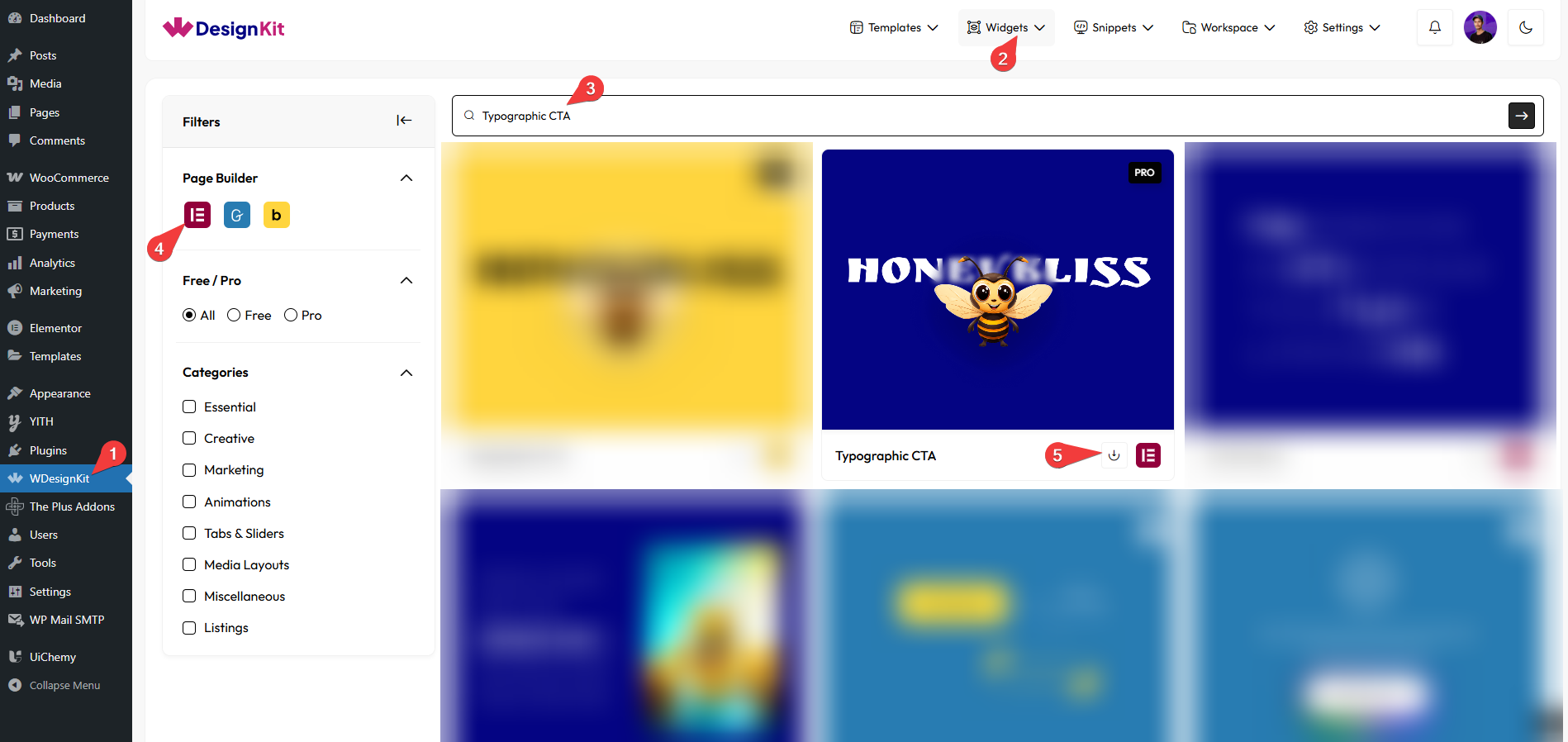
- Drag the widget onto the page, set the Text, URL, and Select Image.
- Set the reveal’s Duration and Speed under Animation.
- Adjust Normal and Hover Opacity for the text and image, and optionally enable Image Glow Effect or set Image Rotate.
8. Use Cases
- An editorial-style hero where hovering a headline reveals a supporting photo
- A portfolio link list where each line reveals a preview image on hover
9. Limitations
- This is a pro-only widget, it does not work without an active WDesignKit Pro license.
- The reveal is hover-triggered, there is no separate click or tap state for touch devices.
10. Troubleshooting
- Widget does not appear in the panel after download: confirm the WDesignKit Pro license is active, pro widgets stay hidden without one.
- Image never becomes visible: check Hover Opacity is set higher than Normal Opacity, equal values make the hover state invisible.
- Reveal feels too abrupt or too slow: adjust Duration and Speed under the Animation tab.