
How to Generate Invoice on Renewal Purchase?
On this page
What It Does
This is how to generate an invoice for a WDesignKit renewal charge specifically, as opposed to your original purchase invoice.
Why It Matters
Each renewal is a separate charge, and accounting or expense records typically need the specific invoice for that transaction, not the original purchase invoice from a year (or more) earlier.
What You Get
A per-transaction invoice download from your Purchase History, matched to the exact renewal charge and date, as a PDF you can store for your records.
Benefits
Purchase History keeps every transaction listed individually, so you can pull the invoice for one specific renewal without it being mixed together with other charges on your account.
Capabilities
Purchase History lists every charge on your account, original purchases, upgrades, and renewals, each with its own downloadable invoice, so you can generate the exact one you need instead of a combined statement.
How It Works
Every renewal creates its own line item in Purchase History the moment it’s charged, with its own Download Invoice action, it uses whatever billing details are saved on your account at the time of download.
How to Use It
- Visit the POSIMYTH Store and log in with the account used at checkout.
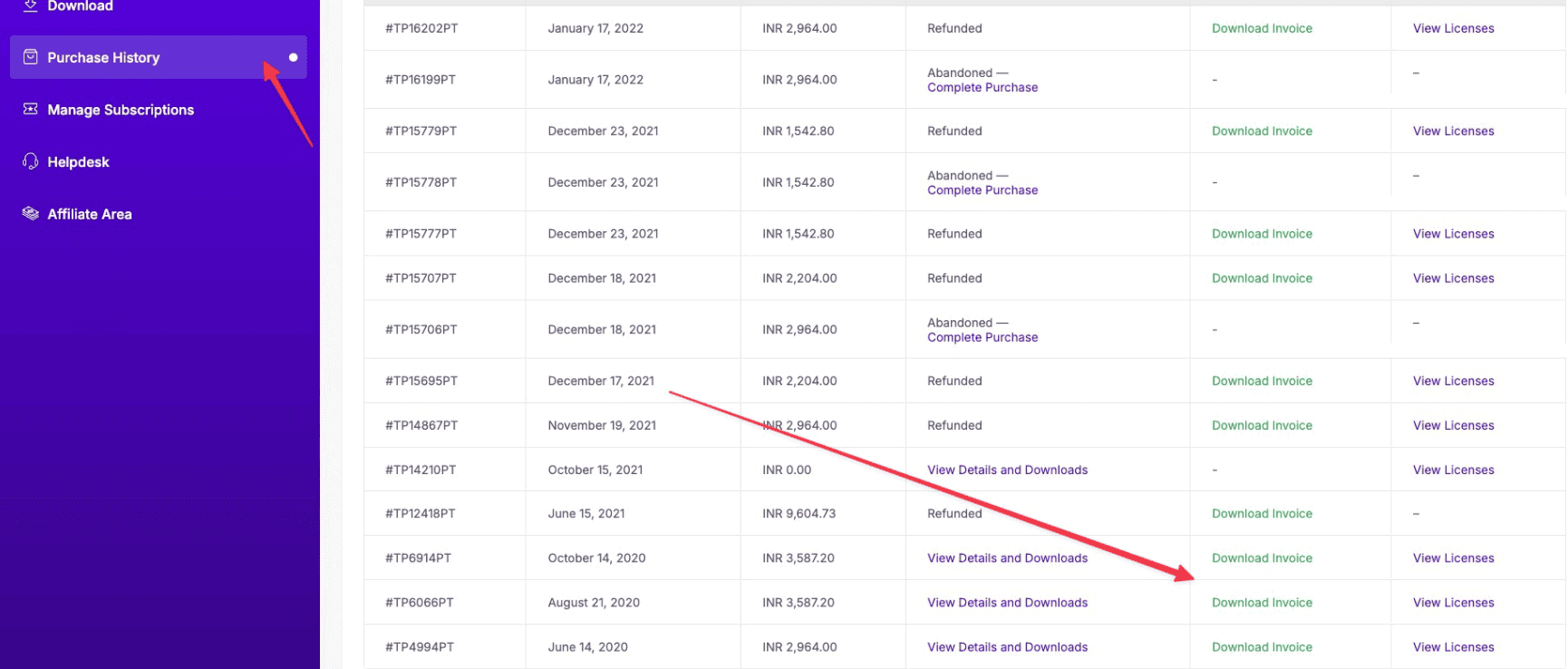
- Go to Purchase History from your Dashboard.
- Find the specific renewal transaction you need an invoice for.
- Click Download Invoice next to that renewal, it downloads as a PDF.
Use Cases
- Expensing a specific renewal charge separately from the original purchase
- Reconciling a bank statement charge against the exact renewal it corresponds to
- Providing proof of an active licence renewal for a client project
Limitations
- The invoice reflects whatever billing details were saved on your account at download time, not necessarily what was current when the renewal actually charged
- Only transactions tied to the logged-in account appear in Purchase History, a renewal paid from a different account won’t show here
- Correcting the company name/VAT ID on a renewal invoice after the fact requires a support ticket, the same as for a first-purchase invoice
Troubleshooting
- Don’t recognise a renewal charge on your statement: a real, recurring pattern, check Purchase History for the exact transaction first; if it’s an auto-renewal you didn’t want, you can request a refund on that specific charge and cancel the subscription in the same ticket so it doesn’t renew again.
- Renewal invoice shows the wrong billing name/address: update your billing details before downloading a new copy; for an invoice already downloaded, contact support with the invoice number to have it corrected.
- Can’t find the renewal transaction in Purchase History at all: confirm you’re logged into the account that owns the subscription, if the charge appears on your bank statement but not here, contact support with the charge date and amount.