
How to Download Widget From Public Library of WDesignKit?
On this page
What It Does
The WDesignKit Public Library lets you browse Elementor widgets, Gutenberg blocks, and Bricks elements that other WDesignKit users have made public, and download any of them straight into your own site’s widget library.
Why It Matters
Building a widget from scratch takes time. The Public Library gives you a ready-made starting point built by someone who already solved a similar problem, so you can ship a page faster and only customize what is actually different for your project.
What You Get
A searchable, filterable catalog of community-published widgets that you can preview and add to your own My Widgets library in a couple of clicks, ready to drop into Elementor, Gutenberg, or Bricks.
Benefits
- Skip building common widgets from scratch by reusing what another WDesignKit user already built and shared.
- Downloaded widgets are fully editable afterward, so they are a starting point, not a locked template.
- Filtering by builder, free or Pro, and category means you spend less time scrolling to find a fit.
Capabilities
- Filter the Public Library by page builder, sub-builder type, category, free/Pro status, and a keyword search.
- Download a widget by its own cloud ID, either a public marketplace widget or, once logged in, one of your own previously uploaded cloud widgets.
- Downloaded widgets land in My Widgets on your site, and also show under Widgets > Download in the WDesignKit app.
How It Works
Clicking the download icon on a Public Library widget calls WDesignKit’s widget-download endpoint for that widget’s cloud ID. WDesignKit then writes the widget’s PHP, JSON config, CSS, and JS files into your site’s local widget library, where it behaves exactly like a widget you built yourself.
How to Use It
Are you looking to enhance your website with additional widgets? With WDesignKit, you can access a vast collection of widgets created by other WDesignKit users in the public library. This allows you to download and integrate these widgets into your website easily.
Requirement – This feature is a part of The WDesignKit, make sure it’s installed & activated to enjoy all its powers.
In order to download widgets from the WDesignKit Public Library, from the WDesignKit plugin page, go to the Widget page.
Note: Make sure to login into your account from the WDesignKit plugin page.
Here you’ll find ready made widgets shared publicly by you and other WDesignKit users.
You can use the Filter panel to search widgets, filter by page builder, free or paid and by categories easily.
Go to the widget you want to download and click on the download icon, and it will be downloaded to the My Widgets page.
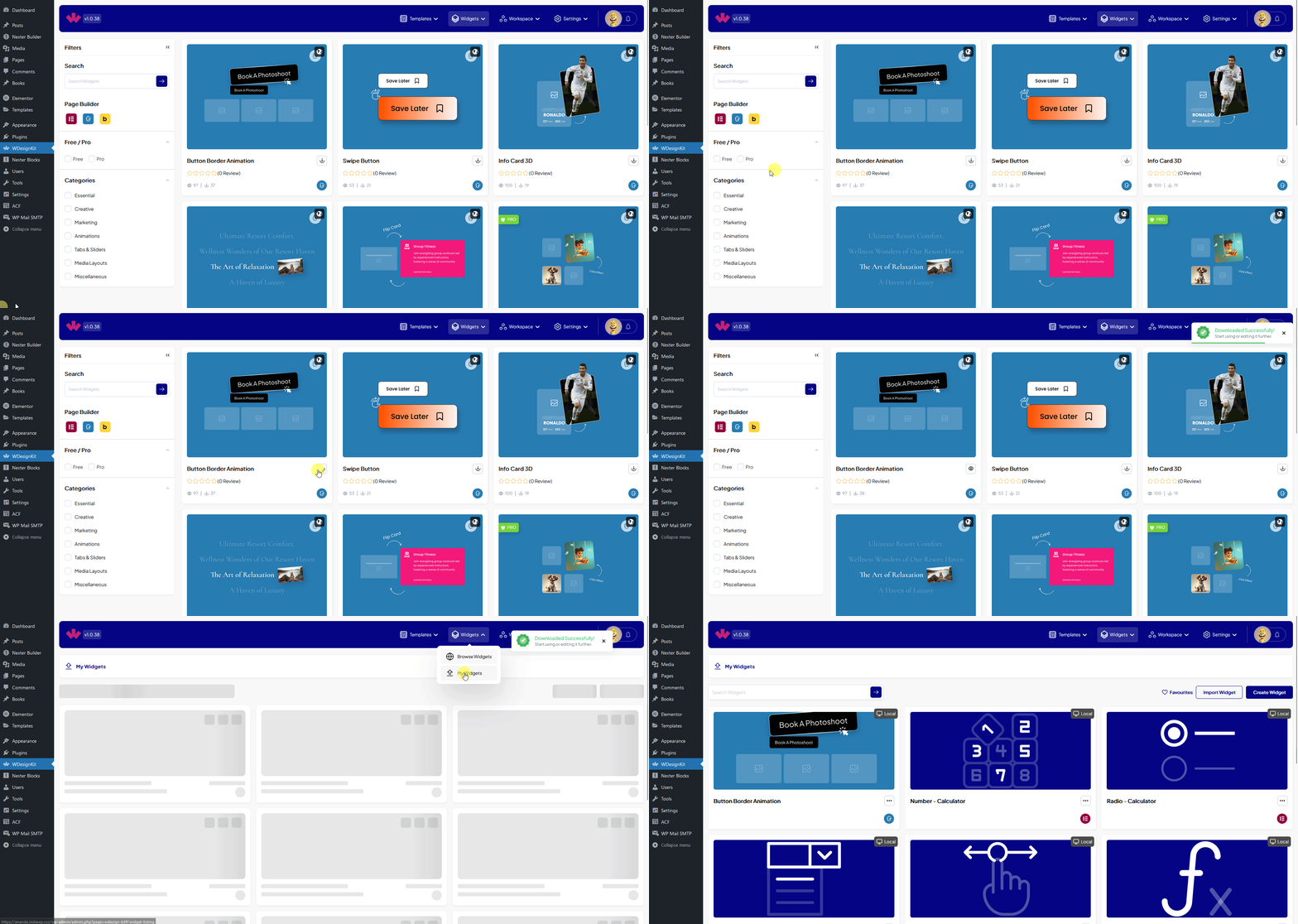
You can also go to the Widgets > Download page from the WDesignKit app to see your downloaded widgets or blocks.
Note: Make sure to login into your account on the WDesignKit app page.
Use Cases
- Finding a ready-made widget for a common pattern, such as a pricing table or testimonial slider, instead of building one from zero.
- Comparing a few free widgets in the same category before deciding which one fits a design.
- Re-downloading one of your own previously shared widgets onto a new site.
Limitations
- Downloading Pro widgets requires an active WDesignKit login and, for Pro-only widgets, an active Pro licence.
- A widget built for one builder, such as Elementor, does not automatically become available in another builder; WDesignKit does not currently convert a widget across builders.
- This session’s WDesignKit connector was not logged in to a cloud account, so the exact Public Library screen and its current filter labels could not be re-captured live; the steps below reflect the plugin’s existing documented flow and were not independently re-verified against today’s screen.
Troubleshooting
- Download icon does nothing or shows a login prompt. Make sure you are logged in to your WDesignKit account from the plugin page first; downloading requires an active session.
- A Pro widget will not download or activate. Confirm your Pro licence is active under Settings > Manage Licence; Pro widgets stay locked without it.
- Downloaded widget does not appear in the page builder. This is workflow-derived guidance, not sourced from a specific support ticket this session: refresh the builder panel or reload the editor, since a newly downloaded widget sometimes needs a page reload to register.