
How to Renew WDesignKit License?
On this page
What It Does
Renewing restores or continues update access on a WDesignKit Pro licence, whether it renews automatically or you need to trigger it yourself after it’s expired.
Why It Matters
A lapsed licence stops receiving new templates, widgets, features, bug fixes, and security patches. Renewing is what brings that access back without needing to buy a fresh licence from scratch.
What You Get
Automatic renewal if you left it on, or a one-click Renew button on your expired plan if you’re on manual renewal, either way, no need to repurchase.
Benefits
Renewing keeps your existing licence key and account history intact, you don’t lose your templates, widgets, or workspace history the way starting over with a new purchase might complicate.
Capabilities
Renewal applies per-product, a WDesignKit renewal doesn’t renew a separately-purchased The Plus Addons for Elementor or Nexter Blocks licence, and vice versa. Auto-renewal charges the payment method on file at the plan’s listed price unless you’ve cancelled or switched to manual beforehand.
How It Works
With auto-renewal on, the store charges your saved payment method on the renewal date and extends your licence automatically, no action needed. With manual renewal, the subscription simply expires on that date and stays expired until you click Renew and complete checkout yourself.
How to Use It
If auto-renewal is enabled, you don’t need to do anything, it renews on its own. If you have manual renewal selected, follow these steps:
- Log in to your POSIMYTH Store account.
- From your Dashboard, go to Manage Subscriptions.
- Find the Expired plan and click Renew.
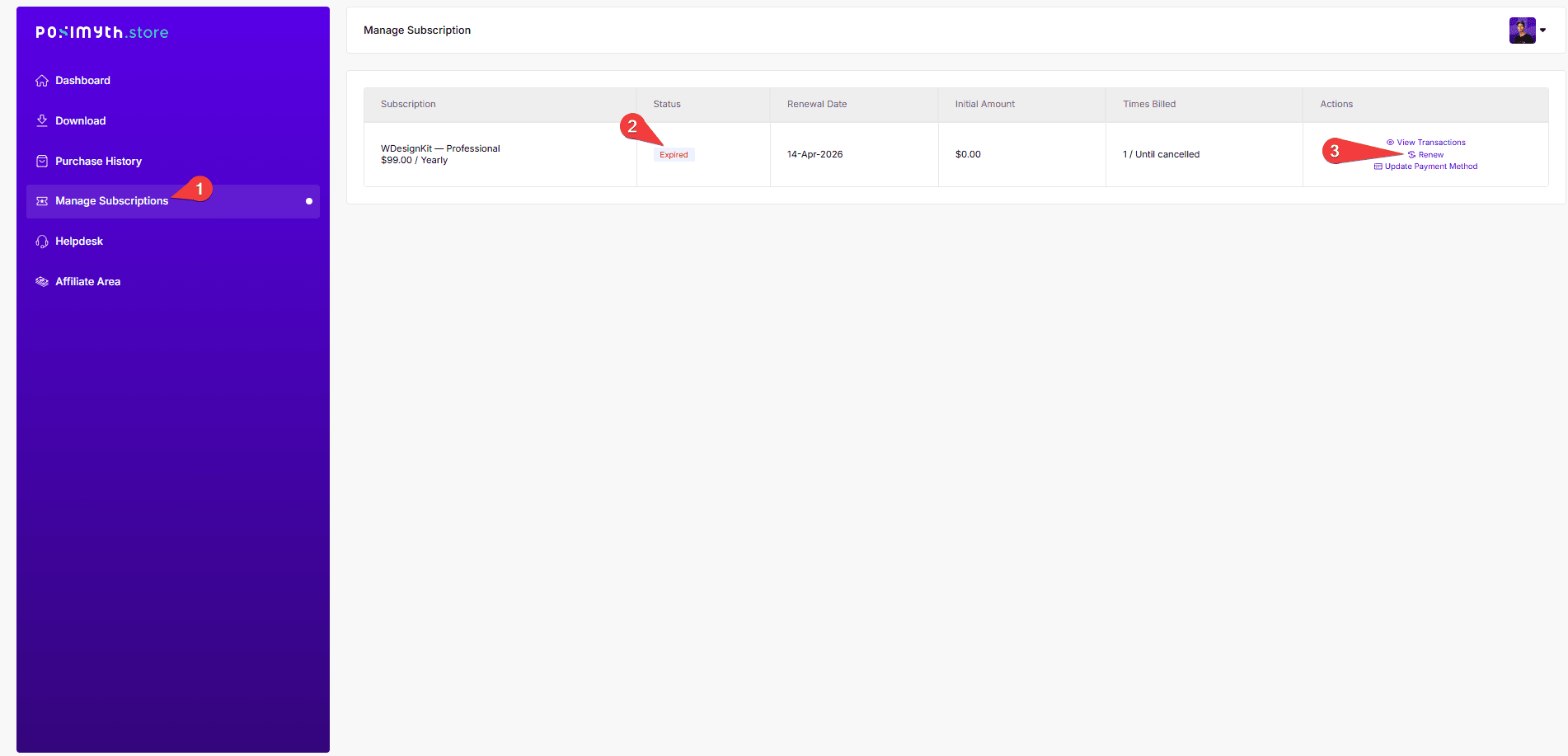
- You’re redirected to checkout, complete payment to reactivate the licence and restore update access.
Use Cases
- A subscription lapsed after switching to manual renewal, and you now want updates back
- Preparing to install a major WordPress or Elementor update and needing a current licence first
- Confirming whether a subscription is set to auto-renew before it charges you unexpectedly
Limitations
- Renewal happens at the plan’s current listed price, a lapsed legacy or promo-priced plan doesn’t renew at its original discount
- Payment can fail on renewal if your saved card is expired or your billing address doesn’t meet a payment processor’s regional requirements, this stops the renewal even with auto-renew enabled
- A renewed licence key doesn’t automatically update the key entered inside WordPress, the plugin re-syncs the licence status, but a fully replaced key would need re-entering
Troubleshooting
- Renewal payment fails with an export/regulations error (for example, a message about needing a customer name and address for export transactions): this is a payment-processor compliance requirement, not a WDesignKit restriction, contact support so they can update the billing record with the missing details on their end.
- Renewed but WordPress still shows the licence as expired/invalid: a reported pattern when the renewal invoice doesn’t map to the key already entered in Manage Licence, contact support with your renewal invoice number to confirm which key should be active, then re-enter it if it changed.
- Not sure if auto-renewal is on: check Manage Subscriptions on the POSIMYTH Store, it shows the renewal date and whether it’s set to auto-renew or requires manual action.