
Scroll Portfolio Widget for Elementor
On this page
The Scroll Portfolio widget is a pro widget that displays a cascading, scroll-scaled stack of portfolio items.
1. What It Does
Stacks a list of portfolio items with background images, and scales each one as the visitor scrolls past it, creating a cascading reveal effect.
2. Why It Matters
A scroll-scaled portfolio gives project showcases a sense of depth and motion that a plain grid does not, useful for agency or design-studio portfolio pages.
3. What You Get
A Portfolio repeater with title, description, tags, button, and background image per item, alignment controls, and per-device scale settings for the cascading effect.
4. Benefits
Skipped, already covered above: the value is the cascading scroll-scaled reveal described in Why It Matters and What You Get, restating it here would not add anything new.
5. Capabilities
- Portfolio repeater, each item with Title, Description, Tags, Button Text, Button Icon, Url, and Background Image
- Full Item Link toggle to make the whole item clickable instead of just the button
- Horizontal Alignment and Vertical Alignment controls per responsive device
- Exclude Last Slide toggle to skip scaling on the final item
- Desktop Scale, Tablet Scale, and Mobile Scale controls for the cascading effect
6. How It Works
As the visitor scrolls, each Portfolio item scales down according to the Desktop, Tablet, or Mobile Scale value as the next item slides over it, creating the cascading stack effect. Exclude Last Slide stops the final item from scaling so the stack settles cleanly.
7. How to Use It
- Confirm a WDesignKit Pro license is active, this is a pro-only widget.
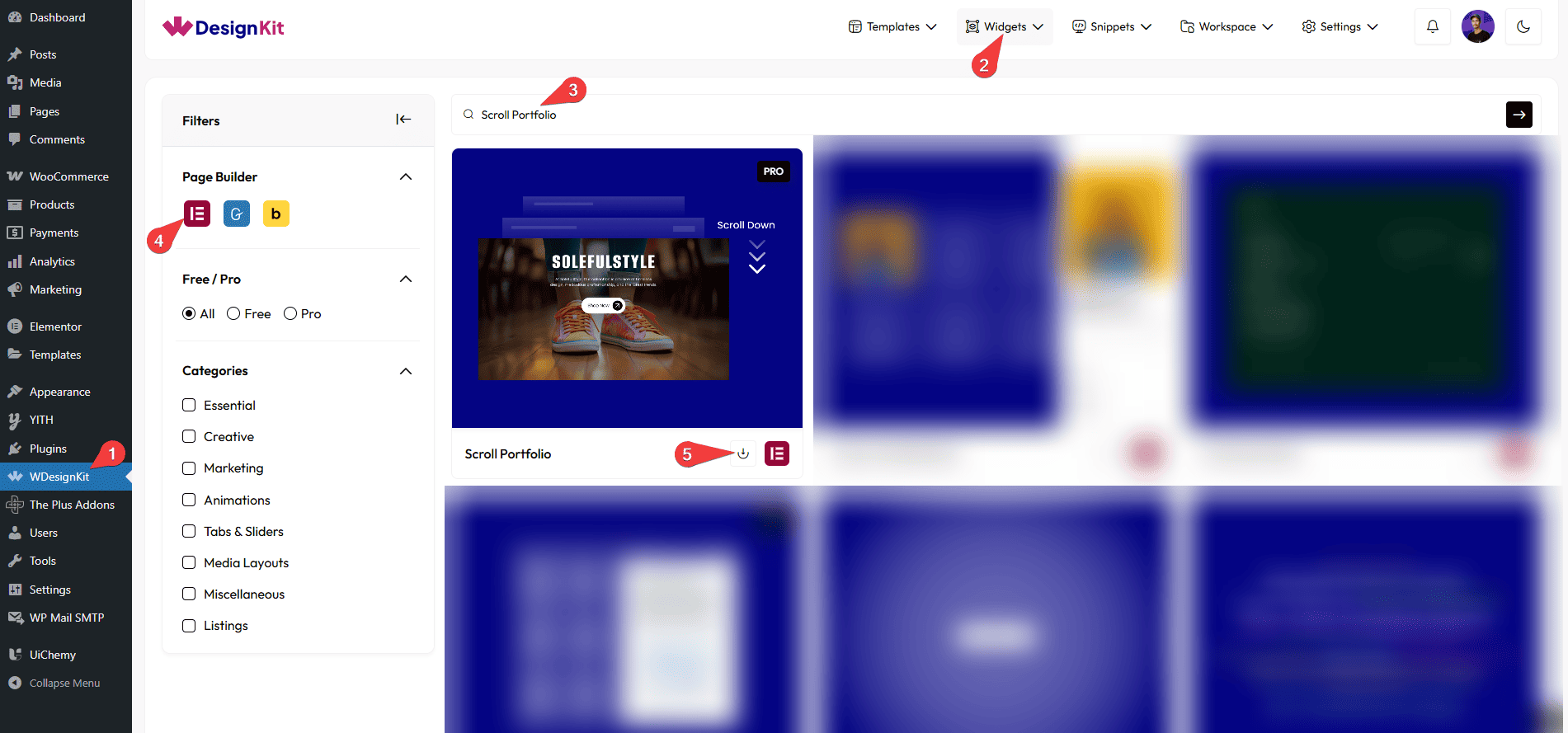
- Activate the Scroll Portfolio widget from WDesignKit’s Ready Widgets.
- Drag the widget onto the page and add items under Portfolio, each with a Title, Description, Tags, and Background Image.
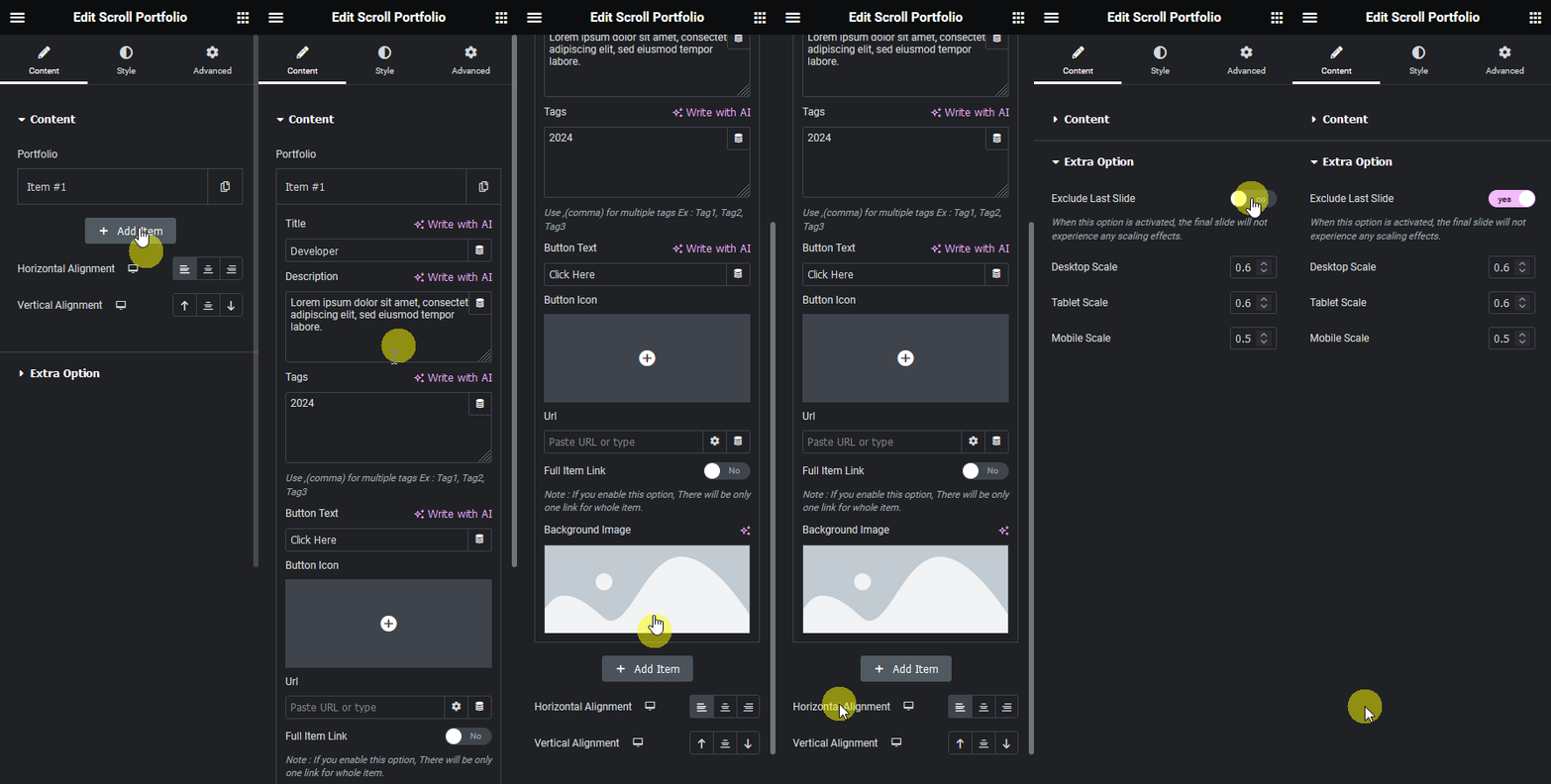
- Set the Button Text, Button Icon, and Url, or enable Full Item Link to make the entire item clickable.
- Adjust Horizontal and Vertical Alignment, then set Desktop, Tablet, and Mobile Scale under Extra Option.
8. Use Cases
- An agency or studio portfolio page with a cascading project reveal
- A case-study index where each entry scales away as the next one scrolls into view
9. Limitations
- This is a pro-only widget, it does not work without an active WDesignKit Pro license.
- Scale values apply to the whole set of items per device, individual items cannot use a different scale from the rest.
10. Troubleshooting
- Widget does not appear in the panel after download: confirm the WDesignKit Pro license is active, pro widgets stay hidden without one.
- Last item scales away instead of settling: enable Exclude Last Slide so the final item stays full size.
- Cascade feels too subtle or too strong: adjust Desktop Scale, Tablet Scale, or Mobile Scale independently, each device has its own value.