On this page
Key Takeaways
- WDesignKit is a free WordPress plugin with 30,000+ active installations and a 4.8 out of 5 rating on WordPress.org, and it imports full page kits into Elementor or Gutenberg without switching themes.
- The live WDesignKit marketplace has no purpose-built real estate or property-listing website kit for searches like “real estate,” “property,” “realtor,” “agent,” and “listing.”
- PlanPro is the closest live match, and its architecture and interior-design layout includes a large hero, a portfolio section, a services breakdown, and a testimonials block; its Elementor version has been downloaded over 8,500 times.
- Custom Post Listing, Taxonomy Listing, and Gallery Listing fill the listings gap by providing grid, masonry, or metro layouts, clickable filters for property type or neighborhood, and lightbox photo galleries.
Table of Contents
“Real estate website templates” pulls 480 searches a month in the US at a keyword difficulty of just 9, but a $16.62 cost-per-click, the highest of any template query on this site. Agents are willing to pay more per click than any other vertical we’ve checked, because a listing site converts directly into commission. According to the National Association of Realtors’ Profile of Home Buyers and Sellers, the vast majority of buyers now search for homes online, and roughly 44% start that search online rather than by calling an agent. If a brokerage’s own site does not show up, or shows up looking dated, that lead goes to Zillow instead.
What a real estate website actually needs
A property site has a narrower job than most business sites: show listings with real photos, let a visitor filter by type or location, build enough trust in the agent or brokerage to justify a phone call, and capture that lead before the visitor bounces to a listings portal. That means a property archive, a gallery-heavy layout, and an agent bio built for credibility, not a generic “About Us” paragraph.
All of this runs on WDesignKit, a free WordPress plugin (30,000+ active installations, 4.8 out of 5 on WordPress.org) that imports full page kits into Elementor or Gutenberg without switching themes.
Also Read: Construction Website Templates if you also build for developers and contractors working on the same properties.
The honest gap: there’s no dedicated real estate kit yet
We searched WDesignKit’s live template marketplace for “real estate,” “property,” “realtor,” “agent,” and “listing.” None returned a purpose-built real estate or property-listing website kit. That’s worth saying plainly rather than stretching an unrelated kit’s description to fit the keyword, which is what a lot of “best real estate templates” roundups do. Here’s what the library actually has that transfers well to a property site today, and what still has to be built by hand.
Also Read: Interior Design Website Templates for every PlanPro kit and the other interior design options side by side.
The closest live match: PlanPro (architecture & interiors)
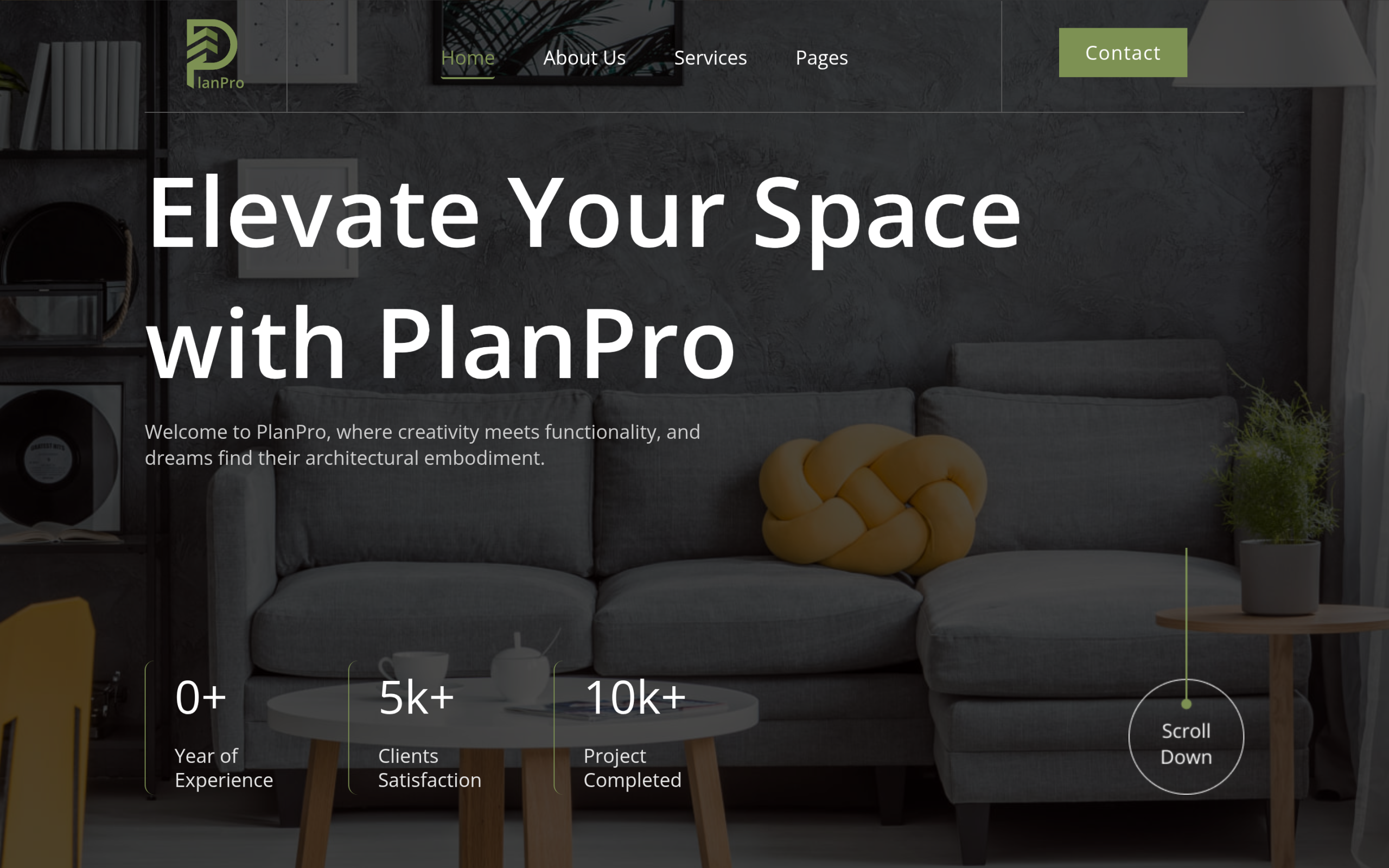
PlanPro is built for architecture and interior-design firms, not agents, but the page structure overlaps more than any other kit in the library: a large hero built around a real space photo, a portfolio section for past projects, a services breakdown, and a testimonials block for social proof. Swap “projects” for “listings” and “services” for “buying / selling / renting,” and the skeleton holds. It’s free, ships for both Elementor and Gutenberg, and its Elementor version alone has been downloaded over 8,500 times, one of the most-downloaded free kits in the library.
Also Read: Portfolio Website Templates: 5 WordPress Kits for more layouts that work as a project or listing showcase.
Filling the gap: the widgets that build a listings page
Since there’s no prebuilt property archive, the fastest honest path is to register listings as a custom post type and lay out the archive with three widgets already in WDesignKit’s library:
- Custom Post Listing – pulls your property post type into a grid, masonry, or metro layout, with filtering and pagination built in.
- Taxonomy Listing – turns property type or neighborhood into a clickable filter list, so a buyer can narrow “condo” or “downtown” without a page reload.
- Gallery Listing – a grid, masonry, or carousel gallery with lightbox viewing, built for exactly the kind of photo-heavy display a listing needs.
None of these are real-estate-specific by name, but stacked together on a PlanPro-based page, they cover the same ground a dedicated listings plugin would, without the extra plugin.
Also Read: Business Website Templates: 3 WordPress Kits Compared if you need a more corporate-leaning shell for a brokerage rather than a solo-agent site.
How to set this up
- Install the free WDesignKit plugin from your WordPress dashboard.
- Open the WDesignKit panel inside Elementor or the block editor and import PlanPro’s homepage and portfolio pages.
- Add a Custom Post Listing widget where the portfolio grid was, pointed at your properties post type.
- Add a Taxonomy Listing widget above it for property-type or location filtering, and a Gallery Listing widget on each single listing page for photos.
Also Read: What Are Template Kits, Sections and Full Pages in the WDesignKit Library for how kits, sections and widgets fit together before you start swapping pieces.
Frequently Asked Questions
Why is it hard to find a real estate website template in WDesignKit?
The gap is real because the live WDesignKit marketplace search for “real estate,” “property,” “realtor,” “agent,” and “listing” did not return a purpose-built property kit. That matters because a lot of template roundups stretch unrelated designs to fit the keyword, which usually leaves you rebuilding the listing structure by hand anyway. WDesignKit Learning Center points to a workaround instead: start from a close match and assemble the property archive with widgets.
What is the best WDesignKit kit to use for a real estate site right now?
PlanPro is the closest live match because its structure maps well to a property site even though it was built for architecture and interior-design firms. The homepage has a large hero, a portfolio section, services breakdown, and testimonials, which translates cleanly into listings, property categories, agent services, and trust signals. It is free, works with both Elementor and Gutenberg, and its Elementor version has been downloaded over 8,500 times.
How do I build a property listings page without a dedicated real estate kit?
The practical route is to register listings as a custom post type and then assemble the archive with three WDesignKit widgets: Custom Post Listing, Taxonomy Listing, and Gallery Listing. That setup gives you grid or masonry layouts, filtering, pagination, clickable location or property-type filters, and photo-heavy presentation without adding another listings plugin. WDesignKit Learning Center frames this as the fastest honest path when no dedicated kit exists.
Does WDesignKit work with Elementor and Gutenberg for a real estate site?
WDesignKit imports full page kits into both Elementor and Gutenberg without switching themes, so it fits either editor workflow. That matters for real estate sites because you can start with PlanPro in whichever editor your site already uses, then place widgets like Custom Post Listing and Gallery Listing where the portfolio sections used to be. The plugin itself is free and has 30,000+ active installations with a 4.8 out of 5 rating on WordPress.org.
What do most people get wrong when trying to build a real estate template?
The common mistake is forcing an unrelated kit to pretend it is property-specific instead of building the listing layer properly. A real estate site needs real photos, filtering by type or location, an agent bio that builds credibility, and enough structure to keep visitors from bouncing to Zillow. The page’s advice is to use PlanPro as the shell and stack Custom Post Listing, Taxonomy Listing, and Gallery Listing on top of it.
Last reviewed: September 29, 2026
Suggested reading
- Portfolio Website Templates: 5 WordPress Kits
- Business Website Templates: 3 WordPress Kits Compared
- Restaurant Website Templates: 3 WordPress Kits Compared
- Elementor Landing Page Templates
- What Are Template Kits, Sections and Full Pages in the WDesignKit Library
Author

Sagar is the Founder & CEO of POSIMYTH Innovations, with 10+ years building WordPress products trusted by 100,000+ websites globally. He has led the development of The Plus Addons for Elementor, Nexter, WDesignKit, and UiChemy, all built hands-on from concept to launch. His work focuses on making website building faster, more flexible, and accessible for creators and businesses worldwide.
Share this article