On this page
- Table of Contents
- What “Bricks Builder Templates” Actually Means
- How Bricks Templates Work Inside the Builder
- Importing and Exporting Templates
- Remote Templates and Components
- Template Settings and Conditions
- What’s Included, and Where WDesignKit Elements Fit
- What Bricks Itself Costs
- Where WDesignKit Fits Into a Bricks Build
- A Practical Workflow: Templates for Structure, Elements for Detail
- Performance Checks After Importing a Bricks Template
- Checklist Before You Commit to a Bricks Template Library
- Suggested Reading
- Frequently Asked Questions
Key Takeaways
- Bricks includes 67 design set templates and 180 wireframe templates free with every plan, grouped into bundles such as Karlson, Auron, Velora, Liv, Sizzle, Reality and Digital.
- Templates import as a single JSON file or a ZIP of several, and Global Import and Export packages styles, structure, templates and settings into one ZIP.
- Remote Templates let one Bricks site expose approved layouts to another using the source site's URL and a password, including nested component dependencies.
- WDesignKit does not sell full-site Bricks templates; it ships 91 of its 239 marketplace widgets as Bricks elements for navigation, pricing, content and scroll effects.
- Bricks 2.6.6, released 14 September 2026, makes Bricks widgets register out of the box the same way Elementor and Gutenberg widgets do.
Table of Contents
A new Bricks site often looks empty next to the mockup a designer sent over, and the gap is rarely the builder itself. It is the starting point: a polished template library on one side, a blank canvas on the other. Bricks users actually have more template options than the builder’s reputation suggests, including a free set of designs that ships with every Bricks license.
This guide covers how templates work inside Bricks, the free and premium libraries worth knowing, with facts taken from each library’s own site in September 2026, what Bricks itself costs, and where WDesignKit’s Bricks elements fit once your layout is in place.
What “Bricks Builder Templates” Actually Means
Templates in Bricks are broader than page designs. The Bricks Academy template library documentation describes template types for headers, footers, sections, single content, archives and popups, so a template can be anything from a complete page to a reusable call to action block. That flexibility is useful, but it also means “template library” can describe very different products: complete websites, sections you assemble into pages, or unstyled wireframes you design on top of.
In practice, Bricks templates reach your site in three ways: the free design sets and wireframes Bricks provides itself, template files you import as JSON or ZIP, and copy and paste layouts from third-party libraries. Which route you pick decides how much design work is left for you after the import.
How Bricks Templates Work Inside the Builder
Importing and Exporting Templates
Bricks Academy explains that you can import a single template as a JSON file or several templates at once as a ZIP file, using the import option in the template library or under Bricks, Templates in the WordPress dashboard. Exports work the same way in reverse: a single template downloads as JSON, and bulk actions export several templates at once as a ZIP. For moving an entire design system between sites, Bricks also offers Global Import and Export, which packages global builder data such as styles, structure, templates and settings into one ZIP.
Remote Templates and Components
Remote Templates let one Bricks site use templates exposed by another Bricks installation, connected with the other site’s URL and a password. Bricks Academy notes that remote templates which use components can transfer those components as well, including nested component dependencies. For an agency, that means one master site can hold approved layouts and every client build pulls from it, instead of copying files around by hand. Bricks’ settings also include password protection for the remote sites that access exposed templates or components.
Template Settings and Conditions
Headers, footers, single templates and archives do not apply themselves. They are controlled by template settings and conditions, so an imported header is only live once its conditions point at the right pages. Check those settings straight after an import rather than assuming a template is active, especially when a library ships several header variations at once.
What’s Included, and Where WDesignKit Elements Fit
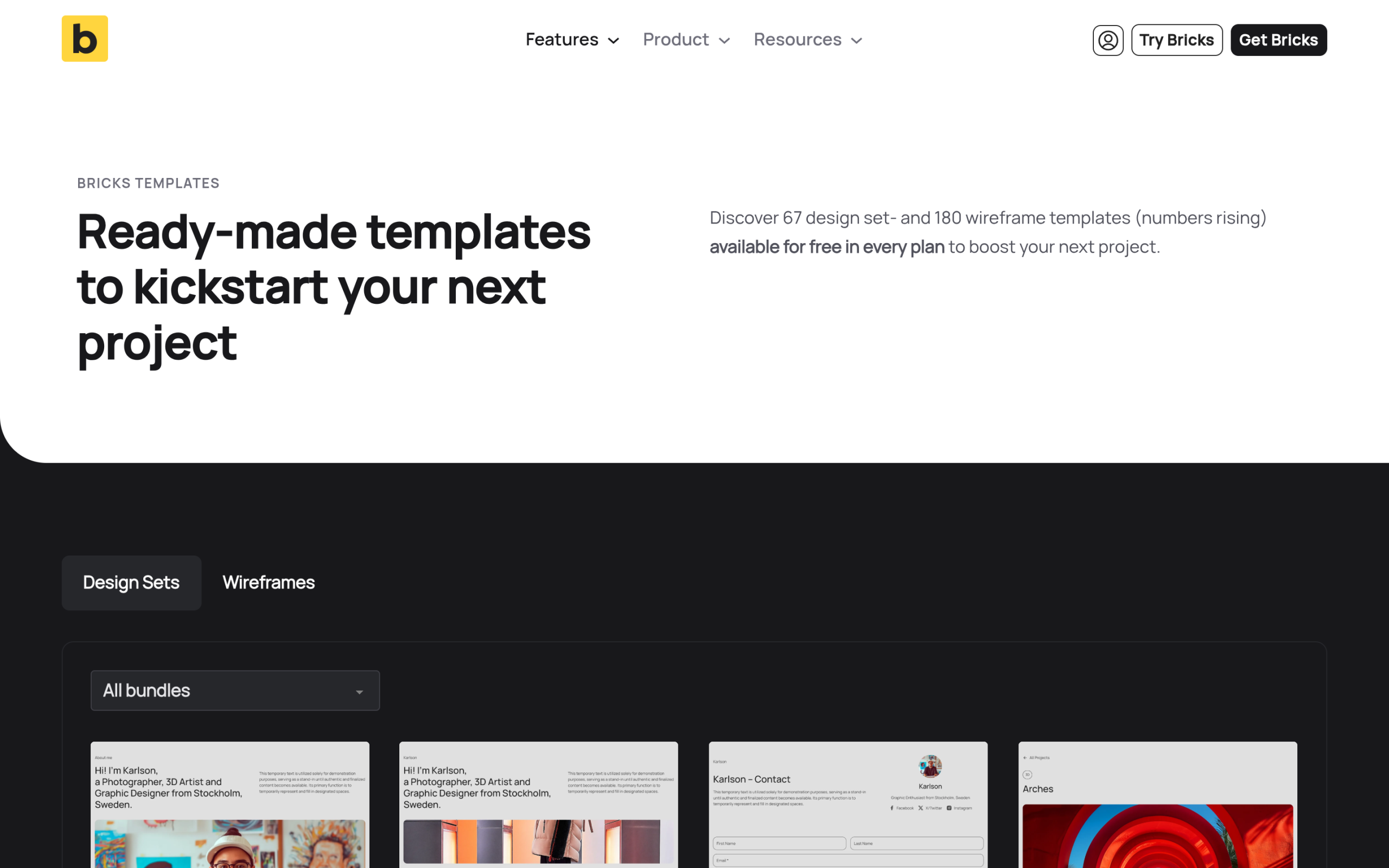
Start with what you already own. The Bricks templates page lists 67 design set templates and 180 wireframe templates, with the numbers rising, available for free in every plan. Design sets are grouped into named bundles such as Karlson, Auron, Velora, Liv, Sizzle, Reality and Digital. Wireframes cover functional building blocks, including headers, footers, hero sections, pricing, forms, blog layouts, FAQ sections, testimonials and WooCommerce. Because they come with the license, they are the lowest-risk starting point for any Bricks build.
Those included wireframes give you page structure, not the interaction detail that makes a page feel finished. That is where WDesignKit’s own library comes in: 91 of its 239 marketplace widgets are built as Bricks elements, made to drop into any wireframe or design set you start from and cover the navigation, pricing, content and scroll-effect gaps a stock template usually leaves open. The full breakdown is below.
Also Read: Elementor to Bricks: What Transfers and What You Rebuild if you are moving an existing Elementor site onto Bricks rather than starting fresh.
What Bricks Itself Costs
Template budgets sit on top of the builder license. Bricks is sold as a theme license, and its pricing page lists four plans at the time of writing:
| Plan | Price | Websites |
|---|---|---|
| Starter | $79 a year | 1 |
| Business | $149 a year | 3 |
| Agency | $249 a year | Unlimited |
| Ultimate Lifetime | $599 one-time | Unlimited |
Because the design sets and wireframes are included in every plan, a Starter license plus a free library is a genuinely workable setup for a first project. Paid libraries earn their cost once you are building several sites a year.
Where WDesignKit Fits Into a Bricks Build
To be upfront: WDesignKit does not sell full-site Bricks templates. Its template library of 3,675 templates is made up of 2,040 Elementor templates and 1,635 Gutenberg templates. What it ships for Bricks is elements, currently 91 of the 239 widgets in its marketplace, and they are designed to be dropped into whatever template you are already using to add the interaction details a stock template rarely includes.
Bricks support also got simpler recently. Version 2.6.6, released on 14 September 2026, made Bricks widgets register out of the box in the same way as Elementor and Gutenberg widgets, and fixed Bricks showing as off in the MCP settings ability even when it was on.
| Need | WDesignKit Bricks elements | Tier |
|---|---|---|
| Navigation | Mini Hamburger Menu, Toggle Menu, Flip Card Menu | Free |
| Navigation | Hover Smooth Side Menu, Side Sticky Header Menu | Pro |
| Pricing | Advanced Pricing With Toggle, Toggle Pricing Features Table | Free |
| Content and blogs | Modern Hover Post Slider, Swipe Post Slider, Post News Ticker | Pro |
| Search and signups | Inline AJAX Search Bar, Animated Subscribe Button | Free |
| Scroll and image effects | Content Scroll Animation, Column Scroll, Image Hover Invert Cursor Effect, Image Stack, Infinite Image Draggable Cube, Flashing Circular Rotating Gallery | Varies by element |
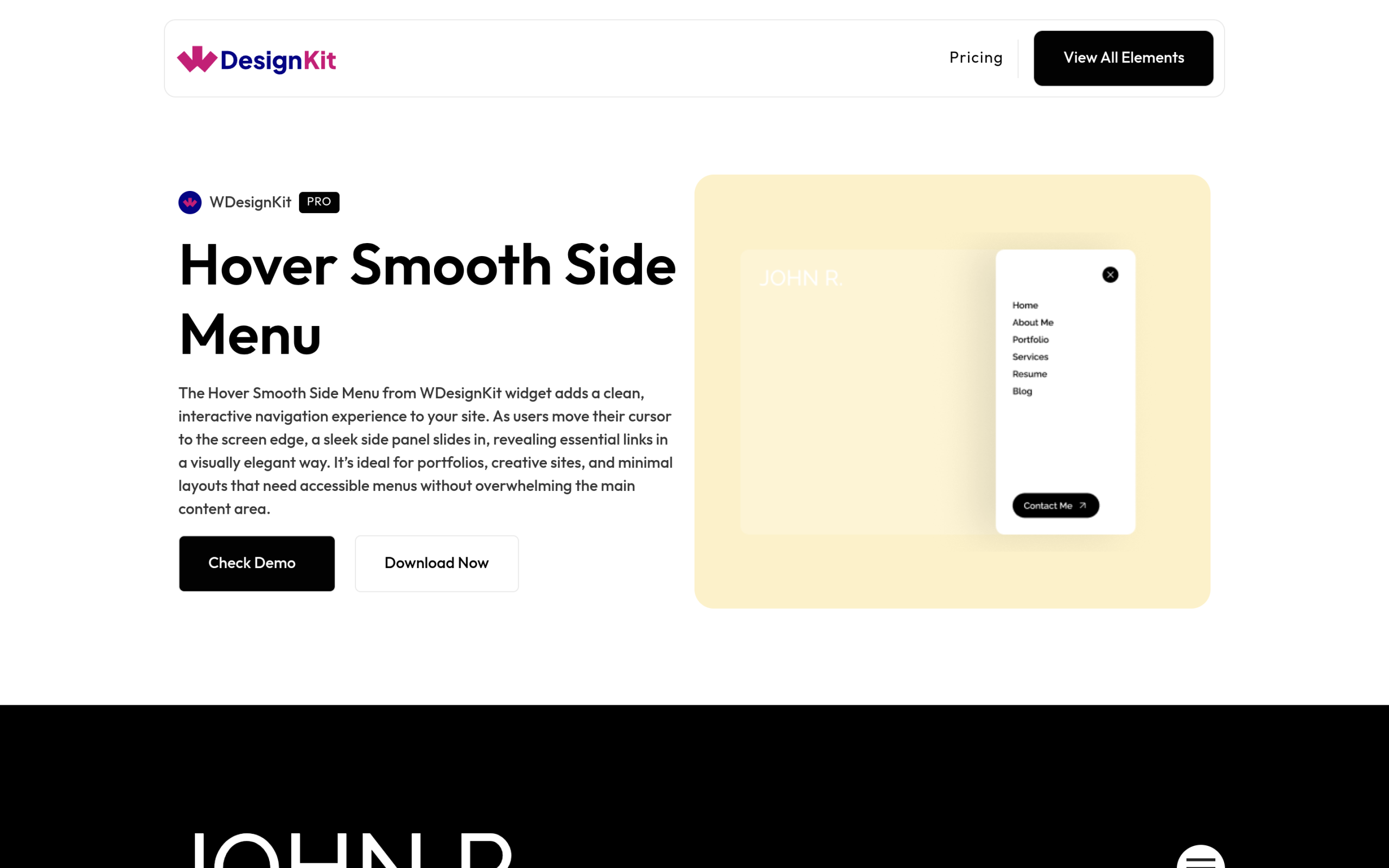
Navigation is a good example of where these elements help. A Bricks wireframe gives you a header structure, and an element such as the Hover Smooth Side Menu adds a slide-in panel that WDesignKit describes as a clean, interactive navigation for portfolios, creative sites and minimal layouts.
If none of the ready-made elements fits, the WDesignKit Widget Builder creates custom Bricks elements as well as Elementor widgets and Gutenberg blocks. Widgets you build there can be converted between those builders with the 1-Click Widget Convertor, which WDesignKit says carries over about 90% of the design and logic, with some advanced controls depending on what the target builder supports.
A Practical Workflow: Templates for Structure, Elements for Detail
- Set up theme styles and global classes in Bricks first, so every imported layout inherits your colours and typography.
- Start with Bricks’ own design sets or wireframes, and only reach for a paid library when they do not cover the page type you need.
- Import or paste the layout, then check template conditions for headers, footers and archives straight away.
- Replace placeholder images and copy before adding any effects, so you judge the layout with real content.
- Add WDesignKit elements for navigation, pricing or scroll effects where the template feels static.
- Save finished sections as templates, or expose them through Remote Templates, so the next build starts further ahead.
- Test every page on a real phone before launch, since imported layouts often carry desktop spacing into mobile.
Performance Checks After Importing a Bricks Template
Bricks has a reputation for lean output, but an imported template can still bring extra weight with it. A short review after each import keeps that reputation intact:
- Clean up leftover global classes and styles that came with the demo but are not used on your pages.
- Swap demo images for properly sized ones, since template previews often use large images that look fine on a fast connection.
- Limit font families and weights to the ones your design actually uses.
- Use scroll and animation effects sparingly, including WDesignKit’s, and keep them to the sections where they add meaning.
- Load a framework only if you use it, so a library built on Automatic.css is not adding styles to a site that does not need them.
- Test real pages, not the demo, with your own content in place before judging speed.
None of these steps take long, and together they make sure the time a template saves during the build is not paid back later in a slow site.
Checklist Before You Commit to a Bricks Template Library
- Framework requirement. Does it need Automatic.css or another framework you do not already use?
- Client site terms. Can you use the templates on client sites, and on how many?
- Import method. Copy and paste, JSON or ZIP files, or Remote Templates, and which one fits your workflow.
- Update cadence. How often new templates arrive, and whether old ones are maintained.
- Accessibility. Whether the markup is semantic and keyboard friendly out of the box.
- Coverage. Whether it includes the page types you actually need, such as WooCommerce, blog and forms.
- Total cost at your site count. Library plus Bricks plus any framework license, per year.
Also Read: Business Website Templates: 3 WordPress Kits Compared for how we evaluate template quality on the Elementor and Gutenberg side.
Suggested Reading
- Elementor to Bricks: What Transfers and What You Rebuild
- Switching Page Builders in WordPress Without Losing Your Design
- Elementor Header Templates, Free and Ready to Import
- Best Free Elementor Templates in 2026 (Tested)
Frequently Asked Questions
Why does a Bricks template look imported but not show on the live page?
Template settings and conditions control whether headers, footers, single templates and archives actually apply. An imported header is only live once its conditions point at the right pages, so a template can exist in the builder without affecting the front end. The practical gotcha is to check conditions immediately after import, especially when a library includes several header variations.
What is the easiest way to move Bricks templates between sites?
Bricks supports single-template imports as JSON and bulk imports as ZIP files, and it also has Global Import and Export for moving styles, structure, templates and settings together. That matters when you want more than just one layout copied over. For agencies, Remote Templates can go further by letting one Bricks site expose approved layouts to another site through a URL and password.
Do WDesignKit's Bricks elements require any extra framework?
No. WDesignKit’s Bricks elements are self-contained and drop into any Bricks site, whether you are starting from the built-in design sets, wireframes, or a custom layout, without requiring Automatic.css or another styling framework.
Where do WDesignKit's Bricks elements fit into a build?
Once page structure is in place from Bricks’ own free design sets and wireframes, WDesignKit’s 91 Bricks elements add the interaction and navigation detail, such as the Hover Smooth Side Menu or Advanced Pricing With Toggle, that a stock template usually leaves for you to build by hand.
How much does Bricks cost if I only need one site?
Bricks starts at $79 a year for the Starter plan with 1 website. The other plans are $149 a year for 3 websites on Business, $249 a year for unlimited websites on Agency, and $599 one-time for Ultimate Lifetime with unlimited websites. Since the free design sets and wireframes come with every plan, a Starter license plus what ships in the box is enough for a first project.
Last reviewed: September 29, 2026
Author

Sagar is the Founder & CEO of POSIMYTH Innovations, with 10+ years building WordPress products trusted by 100,000+ websites globally. He has led the development of The Plus Addons for Elementor, Nexter, WDesignKit, and UiChemy, all built hands-on from concept to launch. His work focuses on making website building faster, more flexible, and accessible for creators and businesses worldwide.
Share this article