
Free vs Pro in WDesignKit: What You Get at Each Tier
Contents
- What “Free” Actually Includes in WDesignKit
- What Pro Unlocks
- Widget-by-Widget: What Free Actually Misses
- Template Kits: Free vs. Pro-Only
- When Free Is Actually Enough
- When You’ll Hit the Free Ceiling
- Pro Pricing: Plans and What They Cost
- How to Actually Decide
- Frequently Asked Questions
- Can I use WDesignKit free forever, or is it a trial?
- What happens to a site built on Pro if I downgrade to Free?
- Is the free-to-pro widget split the same across Elementor, Gutenberg, and Bricks?
- Does the Lifetime plan include everything the yearly Pro plan does?
- Do I need Pro to use the AI Widget Builder or the Widget Convertor at all?
- Suggested Reading
- Author
Key Takeaways
- WDesignKit Free plan includes 2 active websites, 1,483 free templates, and 158 free widgets across Elementor, Gutenberg, and Bricks.
- WDesignKit Pro Starter plan raises the site limit from 2 to 3 and unlocks all 239 marketplace widgets plus 3,675 templates.
- AI Widgets Builder stays available on Free with limited assistance, while Pro removes the cap entirely.
- WDesignKit free assets have no watermark, no “upgrade to remove” banner, and no reuse limit across a site.
- Bricks users face the Pro-only gap sooner because Elementor and Gutenberg have deeper free coverage, while Bricks support is newer in the library.
Every WordPress plugin with a free and a paid tier eventually gets the same question: what am I actually missing by staying free? WDesignKit’s free plan is generous enough that plenty of people never look at the pricing page, which makes the gap between the two tiers easy to misjudge in either direction. This breaks down exactly what each tier includes, using the real numbers from WDesignKit’s own pricing page rather than a marketing summary, so the decision to upgrade (or not) is based on what you would actually gain. If you are also weighing WDesignKit against outside options, the WDesignKit vs. Envato Elements comparison covers how the libraries stack up beyond price.
What “Free” Actually Includes in WDesignKit
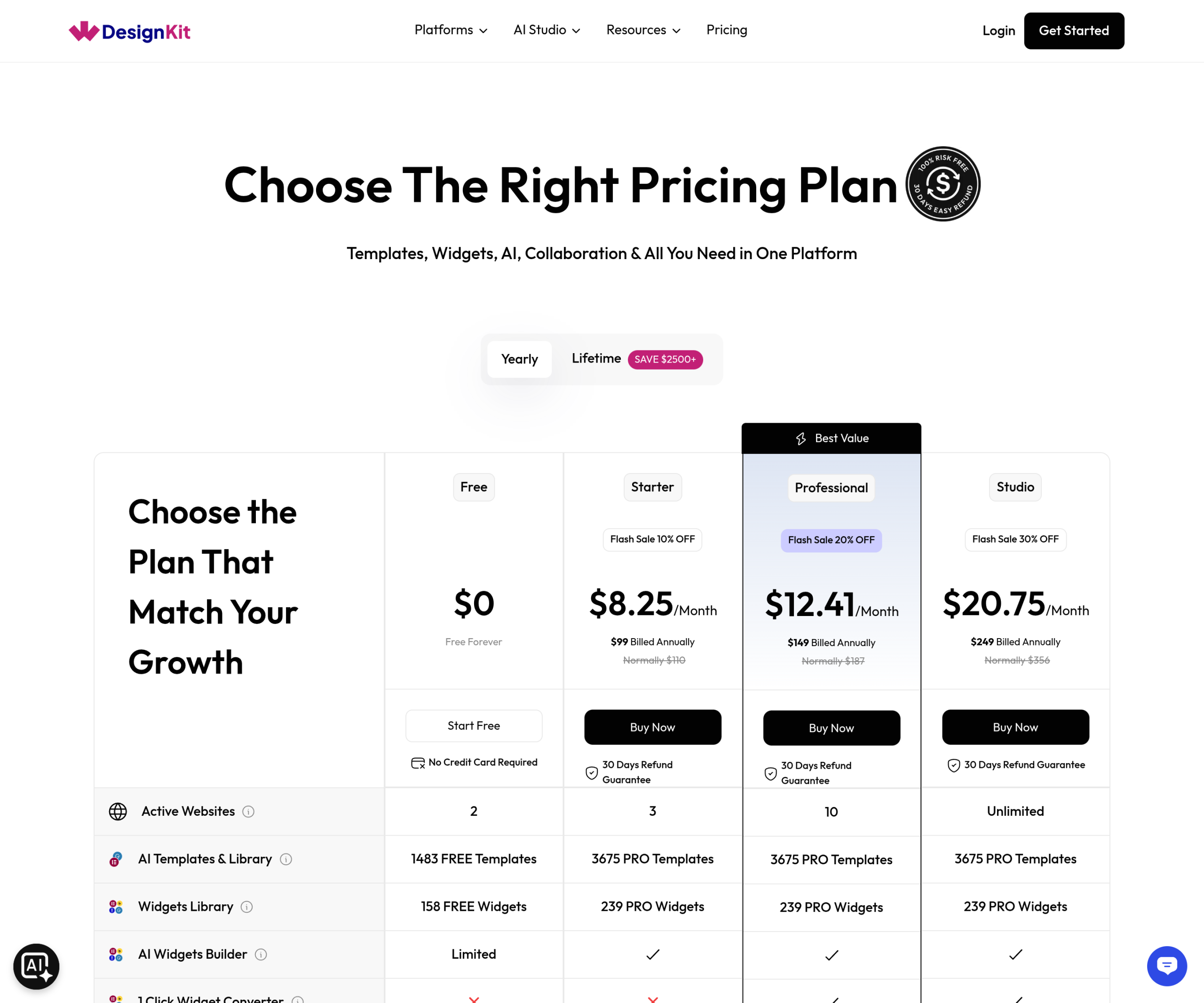
WDesignKit’s free plan is not a stripped-down trial. It is a permanent tier, usable with no credit card and no time limit, and it still covers a real amount of the product. As listed on the live pricing page, the free plan includes 2 active websites, 1,483 free templates across the template library, and 158 free widgets spanning Elementor, Gutenberg, and Bricks.
That widget number is worth sitting with for a second. Out of 239 total widgets in WDesignKit’s marketplace, 158 are available on the free plan, which works out to roughly two out of every three widgets in the library. For most single-site builds, that is enough widget variety to complete a full page without ever hitting a paywall mid-project. The same pattern holds on the template side: free is not a teaser tier meant to push an upgrade within the first hour of use, it is a working set large enough that plenty of real sites ship on it and never touch the Pro filter at all.
The free plan also includes the AI Widgets Builder, though in a limited form rather than the full version. You can still use AI assistance to speed up building a widget from scratch; the free tier just caps how far that assistance goes before it asks for an upgrade.
What is easy to miss on a first look at the pricing page is that the free plan is not a watered-down preview of the paid plan’s library. It is a genuine subset: every free template and free widget works exactly the way its paid counterpart does, with no watermark, no “upgrade to remove” banner, and no artificial limit on how many times a free asset can be reused across a site. The distinction between free and Pro in WDesignKit is which assets you can reach, not how well the ones you already have function.
What Pro Unlocks
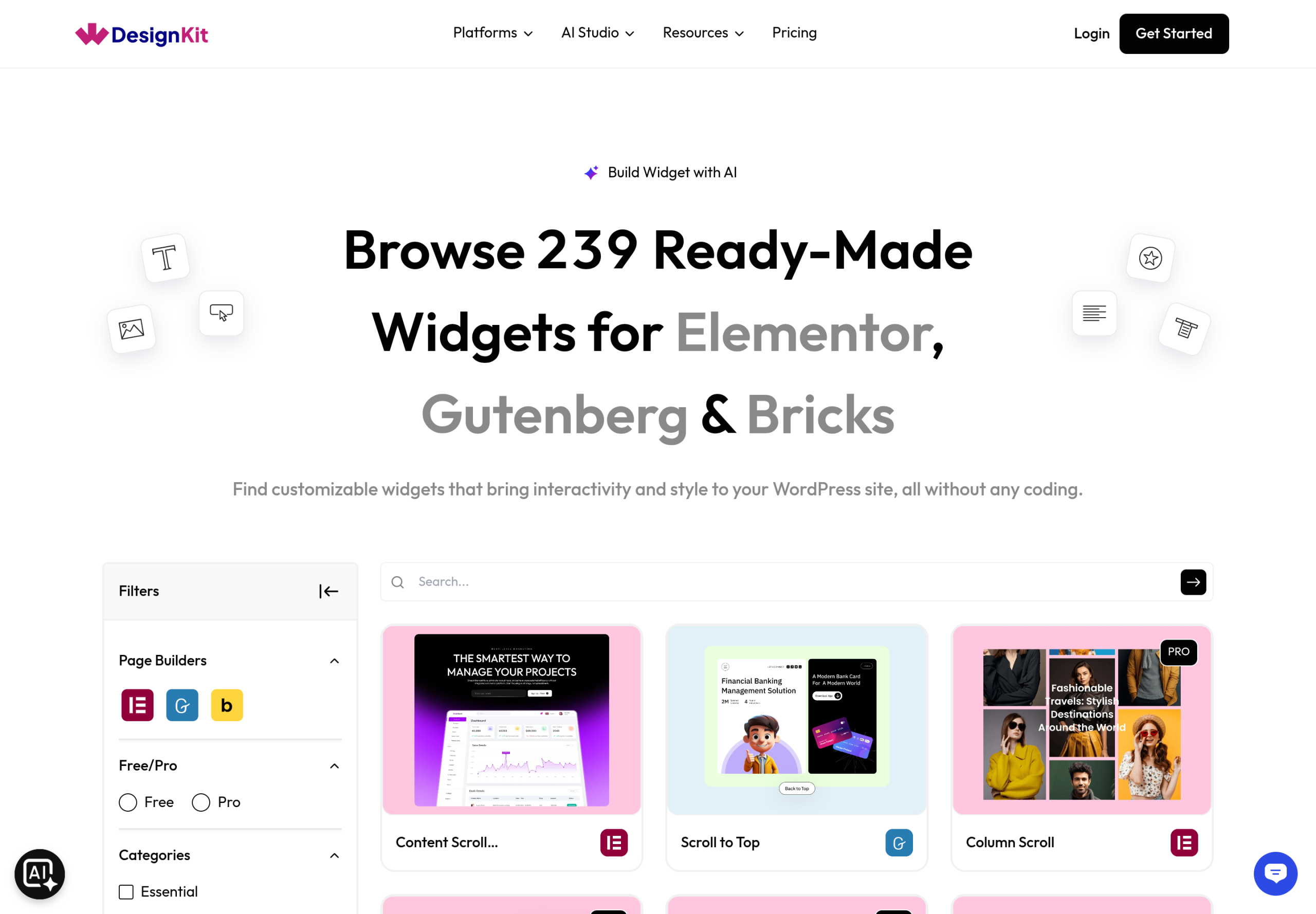
The paid Starter plan currently runs $99 billed annually, which works out to $8.25 a month (listed with a 10% flash-sale discount off the normal $110 annual price at the time this was checked). For that, the active-website allowance goes from 2 to 3, the template count goes from 1,483 free templates to 3,675 templates available on the paid tier, and every one of the 239 marketplace widgets becomes available instead of the 158 on free.
The other change on Pro is the AI Widgets Builder losing its limit entirely. Where the free plan gives limited AI assistance, the paid plan checks that box without a cap, which matters most for anyone building custom widgets regularly rather than assembling pages from the existing library.
The active-website count is easy to skip past but often the deciding factor in practice. Free’s 2-site allowance and Pro’s 3-site allowance are not about how large a single website can be; both plans support full, unrestricted sites. The number caps how many separate WordPress installs can be connected to one WDesignKit account at once. A freelancer running four or five concurrent client builds will hit that ceiling well before they run out of templates or widgets to choose from, which makes the site count, not the content library, the real constraint for anyone doing volume work.
Widget-by-Widget: What Free Actually Misses
The 81 widgets that sit behind the paid tier (239 total minus 158 free) are not evenly distributed across categories. In practice, the widgets held back for Pro tend to be the more specialized, less commonly needed ones: advanced animation and scroll effects, niche layout components, and builder-specific widgets for Bricks that see less overall demand than the core Elementor and Gutenberg sets. The free plan is not thin on basics; it is thin on edge cases.
The practical way to check before committing to either plan is to filter the widget library by Free or Pro directly and search for the specific widget types a project needs, rather than assuming based on category name. A widget that sounds advanced, like a custom timeline or an animated counter, is sometimes free, while a widget that sounds simple can sit behind Pro because of how it is built. Checking by name beats guessing by category every time. The 1-click Widget Convertor is available on every plan too, so turning a one-off section into a widget never depends on which tier you are on.
Builder choice also affects how the split feels day to day. Elementor and Gutenberg have been part of WDesignKit’s widget library the longest, so their free coverage tends to be the deepest. Bricks support is newer to the library, and a Bricks-focused builder is statistically more likely to run into a Pro-only widget for a given task than someone building the same page in Elementor, simply because Bricks has had less time to accumulate free-tier widgets. That gap should close as the library keeps growing, but it is worth knowing about before picking a builder for a project that has to stay on the free plan.
Template Kits: Free vs. Pro-Only
Templates follow the same pattern as widgets but at a much larger scale: 1,483 free templates against 3,675 available once a project moves to the paid plan. That is a bigger jump proportionally than the widget split, since Pro roughly doubles the number of templates on top of what free already includes rather than unlocking a smaller remainder.
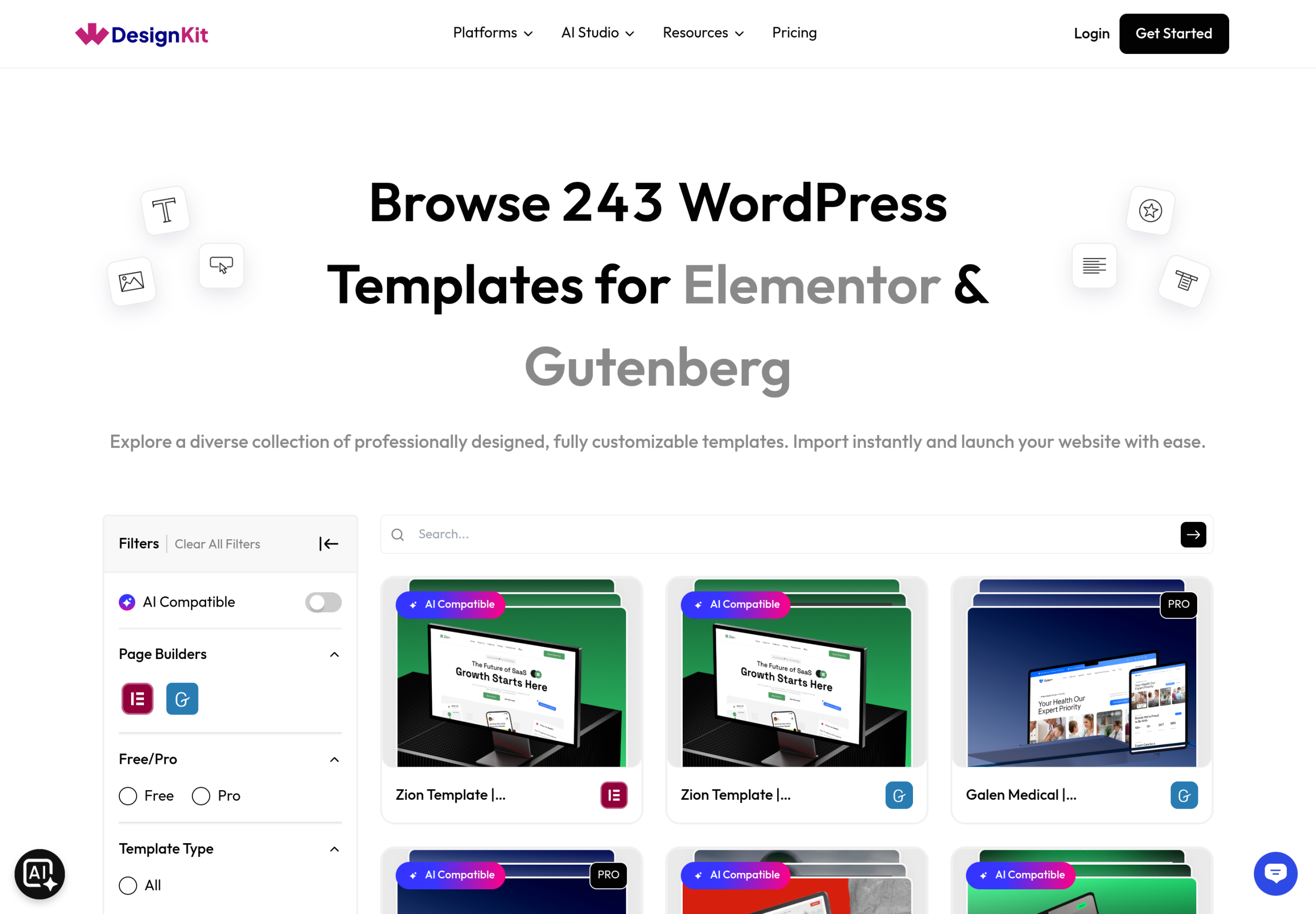
This split matters most to anyone building for a specific vertical. A general “business website” template is well represented on the free tier, since broad categories carry the largest share of the library either way. A template for a narrower niche, like a specific type of clinic or a niche event-planning business, is worth checking against the Pro filter specifically before assuming it is covered on free, since coverage for any single niche category is not guaranteed to mirror the roughly 40/60 free-to-pro split the library shows overall. The safest habit is checking the actual category in the library before quoting a client on which plan a project needs, rather than assuming from the general free-to-pro ratio.
When Free Is Actually Enough
Free covers more real use cases than the phrase “free plan” usually implies. A single personal site, a portfolio, or a small business site built around one of the well-represented common categories is very likely to find everything it needs inside the free plan’s 1,483 templates and 158 widgets. Anyone testing whether WDesignKit fits their workflow before committing to a paid plan can build a genuinely complete site on free first, not just a crippled demo.
Two active websites is also enough for a freelancer running exactly one live client project alongside their own portfolio site, or for anyone maintaining a single business site plus a staging or test environment. The ceiling only becomes a problem once a third concurrent project enters the picture.
Take a concrete example: a freelance designer building a restaurant website on the free plan. The template library’s restaurant category is well populated on free, so the starting point is already there. The build needs a menu display widget, a reservation form, a photo gallery, and a testimonials section, all of which show up in the free widget filter without needing to check the Pro badge once. The only moment Pro would come up is if the client later asked for a second, unrelated site (a catering side-business, say) to be managed under the same account, at which point the 2-site cap becomes the actual limiting factor, not the design library.
When You’ll Hit the Free Ceiling
Agencies and freelancers running more than two live or in-progress WordPress projects at once will hit the active-website limit before they hit any content limit, since that cap applies regardless of how much of the free template and widget library goes unused. That is the single most common reason to upgrade: not running out of design options, but running out of site slots.
The second common trigger is a niche-specific project. A build for an industry with thin free coverage (a specific type of professional service, a niche vertical template category) is more likely to need the larger Pro template pool, since narrower categories are proportionally better represented on the paid tier. Anyone building widgets heavily with AI assistance rather than assembling from the existing library will also feel the free plan’s AI Widgets Builder limit faster than someone doing mostly drag-and-drop layout work.
A less obvious trigger is working across multiple page builders on the same account. Someone who builds primarily in Bricks, and occasionally needs a Gutenberg-specific widget for a client who insists on the native block editor, is drawing from two separate free-tier pools rather than one, which shrinks the effective free coverage compared to a builder who sticks to a single tool. That is not a reason to avoid mixing builders, but it is a reason to check the widget filter by builder before assuming free coverage carries over evenly.
Pro Pricing: Plans and What They Cost
WDesignKit’s paid Starter plan is billed at $99 a year, shown on the pricing page as $8.25 a month, with a 10% flash-sale discount applied against a normal annual price of $110 at the time this was checked. A Lifetime option is also available alongside the yearly plan, listed as saving more than $2,500 compared to paying yearly over time, for anyone confident they will use the product long term and want to stop the renewal cycle entirely.
Pricing, discounts, and exact template or widget counts change as WDesignKit’s library grows, so treat the numbers in this piece as a snapshot rather than a permanent figure, and check the live pricing page directly before budgeting a project around a specific plan.
How to Actually Decide
Skip the pricing page’s own framing for a minute and answer three questions instead. First, how many separate WordPress sites do you need connected right now, not eventually? If the honest answer is one or two, the active-website cap will not push you toward Pro on its own. Second, does the project sit inside a broad, well-covered category (general business, portfolio, restaurant, real estate) or a narrower niche that is more likely to be thin on the free tier? Broad categories lean toward staying free; niche categories lean toward checking the Pro template count before committing to a direction. Third, is AI-assisted widget building a core part of how you plan to work, or an occasional convenience? Heavy AI users feel the free plan’s cap fastest.
Answer those three honestly and the free-versus-Pro decision usually resolves itself without needing to compare every line on the pricing table. Most single-site builders and anyone testing WDesignKit for the first time have no real reason to pay before they hit a specific, concrete limit. Most agencies running three or more concurrent projects will find the Starter plan pays for itself the moment a third site needs connecting, regardless of how much of the template and widget library actually gets used. The upgrade decision, in other words, is rarely about running out of design options. It is almost always about hitting one specific, nameable limit: a site slot, a niche category, or an AI credit cap, not a vague sense that free “isn’t enough” anymore.
Frequently Asked Questions
Can I use WDesignKit free forever, or is it a trial?
The free plan has no time limit and no credit card requirement. It is a permanent tier with its own set of 1,483 templates and 158 widgets, not a trial period that expires.
What happens to a site built on Pro if I downgrade to Free?
Elements built using Pro-only templates or widgets are tied to the license that unlocked them. Check WDesignKit’s own licensing terms directly before downgrading a live site, since specific downgrade behavior can change and is worth confirming against the current terms rather than assumed.
Is the free-to-pro widget split the same across Elementor, Gutenberg, and Bricks?
No. The 158-free-out-of-239-total split is a sitewide total across all three builders, not an even split per builder. Filter the widget library by builder and by Free or Pro to see the actual availability for the specific builder a project uses.
Does the Lifetime plan include everything the yearly Pro plan does?
The Lifetime option is positioned as a one-time alternative to paying yearly, covering the same paid-tier access without a recurring renewal. Confirm the exact feature parity on the live pricing page, since plan structures are the part of any SaaS pricing page most likely to change over time.
Do I need Pro to use the AI Widget Builder or the Widget Convertor at all?
No, both are available on the free plan. The AI Widgets Builder is capped rather than blocked on free, and the 1-click Widget Convertor for turning a section into a reusable widget is not gated behind the paid tier.
Suggested Reading
- What the WDesignKit template library actually covers
- WDesignKit vs. Envato Elements, a full pricing and library comparison
- The 1-click widget convertor, available on every plan
Author

Sagar is the Founder & CEO of POSIMYTH Innovations, with 10+ years building WordPress products trusted by 100,000+ websites globally. He has led the development of The Plus Addons for Elementor, Nexter, WDesignKit, and UiChemy, all built hands-on from concept to launch. His work focuses on making website building faster, more flexible, and accessible for creators and businesses worldwide.
Keep reading
Widget Builder vs Hand-Coding a Custom Elementor Widget: Time Comparison
Key Takeaways Elementor developer docs list 14 methods for a custom widget class, including register_controls(), render() and content_template(). WDesignKit Widget Builder opens with three panels, a Code Editor with HTML, CSS and JavaScript tabs, a Layout panel and a Controller panel. WDesignKit docs say the Create Widget popup asks for four items: builder, widget name, …
12 min read
Interior Design Website Templates: 5 WordPress Kits Compared
Interior design website template picks from WDesignKit: two free PlanPro kits and three Pro Space-Creators kits, compared by portfolio, process and page count.
12 min read
Construction Website Templates: 3 WordPress Kits Compared
Construction website template options from WDesignKit: BuildIQ Elevate, BuildIQ Nexus and Skyframe, compared by real page counts and the contractors each suits.
12 min read