
New In WDesignKit: AI Templates Now Start With One Line About Your Site
Contents
- Key Takeaways
- What Is New In AI Templates
- Watch The Flow In 40 Seconds
- How It Works, Step By Step
- Step 1: Pick Your Builder And Describe Your Site
- Step 2: Choose An AI-Compatible Kit
- Step 3: Answer A Few Quick Questions
- Step 4: Set Your Colors, Fonts And Features
- Step 5: Test It, Or Import It
- Step 6: Let The Import Run
- Who This Is For
- What You Do After The Import
- Frequently Asked Questions
- What Is New In AI Templates?
- Which Builders Does It Work With?
- Do I Have To Answer Every Question?
- Can I Try It Without Touching My Live Site?
- What Happens If The Import Is Interrupted?
- Where Do I Start?
- Try It On Your Next Site
- Author
Every WordPress site starts the same way: a blank canvas, a blinking cursor, and a long list of decisions you have not made yet. The hours go into the layout before a single word of your own is on the page.
We have changed where AI Templates starts. You tell WDesignKit what you are building in one line. From there you answer a few quick questions, choose your colors, fonts and features, try the result on a sandbox site if you want to, and import it. The import itself runs on our server.
Here is what is new, how the flow works, and who it is for.
Key Takeaways
- AI Templates now starts from your description: pick your builder, then say what you are building in one line.
- You answer a few quick questions, and you can skip any that do not apply.
- You set your colors, fonts and the features you want before anything is imported.
- You can test the result on a temporary sandbox site first, or import it straight to your own WordPress site.
- The import runs on our server in resumable steps, so an interruption does not mean starting over.
- It works with Elementor and Gutenberg.
What Is New In AI Templates
Until now, AI Templates started with a kit. You picked an AI-compatible template kit, used AI during the import, then customized the result. That still works, and the kit is still your starting point. What changed is everything around it:
- It starts with your brief. You describe the site first, so the rest of the flow knows what you are building.
- It asks before it imports. A few short questions about your business and what the site needs, with the option to skip any of them.
- You make the design calls up front. Colors, fonts and features are set before the import, so what arrives already fits.
- You can test first. A temporary sandbox site lets you look at the result before it touches your real site.
- The import is built to recover. It runs on our server in resumable steps, so a dropped connection or an interruption picks up where it stopped.
Watch The Flow In 40 Seconds
The demo runs from the first line to the finished import.
How It Works, Step By Step
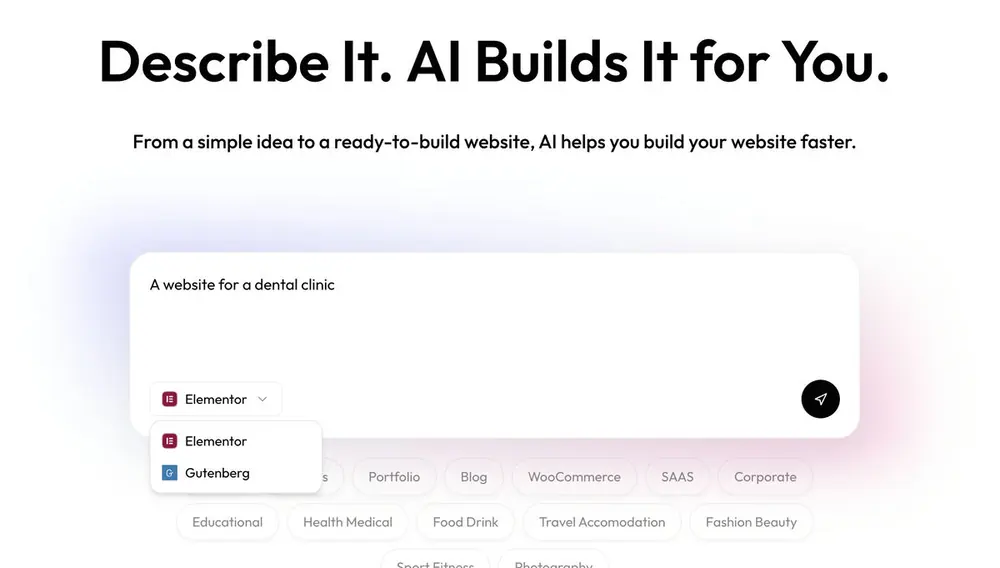
Step 1: Pick Your Builder And Describe Your Site
Choose Elementor or Gutenberg, then write one line about the site. “A website for a dental clinic” is plenty. If you want a push, start from one of these and swap in your own business:
- Create a complete website for a car reseller.
- Build a modern website for a fitness studio.
- Create a professional website for a real estate agency.
- Build a clean, premium website for a digital agency.
Step 2: Choose An AI-Compatible Kit
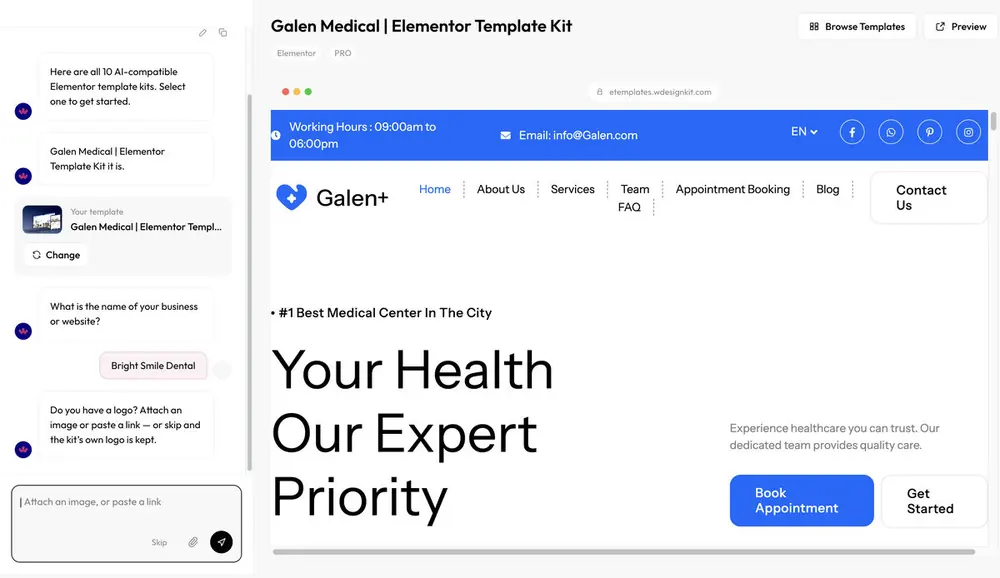
You still start from a real template kit, so you are shaping a site that already looks like a site. The kits arrive with ready content and visuals instead of placeholder layouts. You can browse the AI-compatible kits in the template library before you start.
Step 3: Answer A Few Quick Questions
AI asks a few short questions about your business and what the site needs. Skip any that do not matter to you. A sentence of real detail goes further than a one-word reply, because the answers shape what you get.
Step 4: Set Your Colors, Fonts And Features
Pick the colors and fonts, then choose the features the site should have. These are the big decisions, and making them before the import is the point: the result should look like your site from the first load.
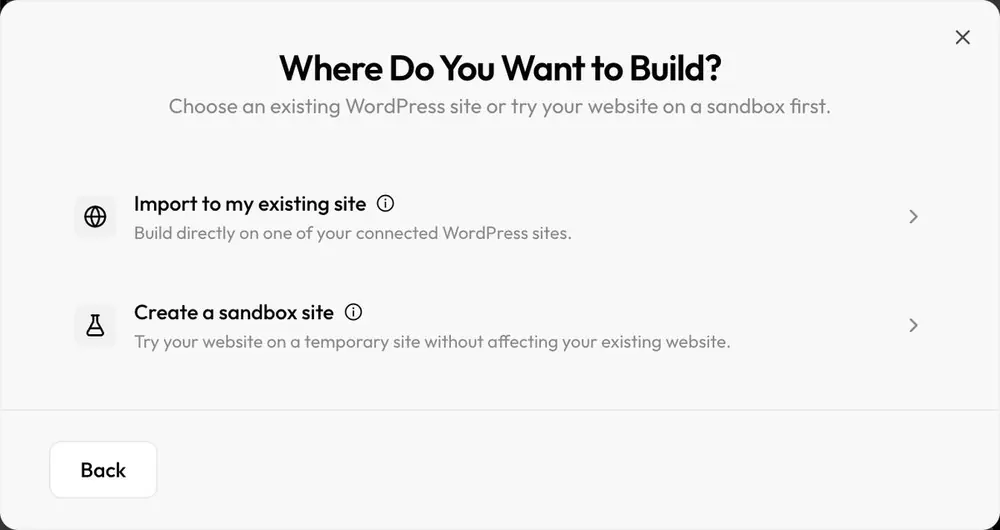
Step 5: Test It, Or Import It
Try the result on a temporary sandbox site first, or import to your own WordPress site. If you are testing a new kit or a new brief, the sandbox is the safer way to look around.
Step 6: Let The Import Run
The import runs on our server in resumable steps. If something interrupts it, it carries on from where it stopped.
Who This Is For
- You are starting a site from scratch and would rather react to a real draft than a blank page.
- You build for clients and want a first version of a niche site to show, fast to set up and easy to throw away on a sandbox.
- You have an idea and want to see it before you commit to a theme, a builder setup or a week of work.
What You Do After The Import
The template gets you to a working starting point. The rest is the part only you can do: words that sound like you, photos of your real work, the offer on the page. Open the site in your builder and refine it like any other.
Curious how AI inside templates differs from AI agents working inside your own site? AI Website Builder For WordPress: What It Actually Means explains the three approaches.
Frequently Asked Questions
What Is New In AI Templates?
The flow now starts from a one-line description of your site. It then asks a few quick questions, lets you set colors, fonts and features, offers a sandbox test, and runs the import on our server in resumable steps.
Which Builders Does It Work With?
Elementor and Gutenberg. You choose your builder at the start.
Do I Have To Answer Every Question?
No. Skip any question that does not apply to your site.
Can I Try It Without Touching My Live Site?
Yes. You can try the result on a temporary sandbox site first, or import it to your own WordPress site.
What Happens If The Import Is Interrupted?
The import runs on our server in resumable steps, so it continues from where it stopped.
Where Do I Start?
Open the AI Template, pick your builder and describe your site in one line.
Try It On Your Next Site
Describe your next WordPress site in one line and see what WDesignKit builds around it. Then tell us where it got your brief right and where it missed. We read the replies, and they shape what we improve next.
Previously: September 2026 Updates
Author

Sagar is the Founder & CEO of POSIMYTH Innovations, with 10+ years building WordPress products trusted by 100,000+ websites globally. He has led the development of The Plus Addons for Elementor, Nexter, WDesignKit, and UiChemy, all built hands-on from concept to launch. His work focuses on making website building faster, more flexible, and accessible for creators and businesses worldwide.
Keep reading
September 2026 Updates: Bricks Widgets Auto-Register, AI Templates And More
WDesignKit September 2026 update: Bricks widgets now register automatically, a Bricks MCP settings fix, six AI-compatible kits and four widgets built to move.
5 min read
August 2026 Update: AI Templates, MCP Abilities & More
WDesignKit August 2026 update: AI-compatible kits, globals import, MCP abilities for WordPress 7.1, security hardening and optional data sharing explained.
12 min read
July 2026 Updates: Standalone Plugin Downloads, Faster Imports & AI Templates
A widget you build in one workspace used to stay in that workspace. This month it stops being stuck. July was about moving work out of WDesignKit and onto whatever site needs it: widgets you can package as real WordPress plugins, a leaner template import, and an upgraded AI Template Import. Here’s what shipped. …
3 min read