On this page
- Table of Contents
- Table of Contents
- What is WordPress Studio?
- How WordPress Studio runs WordPress
- Three ways to use WordPress Studio
- How to create your first site in WordPress Studio
- Import an existing site
- Studio Code: the AI agent inside WordPress Studio
- What Studio Code can do
- How to start Studio Code
- What it costs
- Use your own AI agent with Studio over MCP
- Blueprints, preview sites and sync
- Blueprints
- Preview sites
- Selective sync
- WordPress Studio vs Playground vs Local
- Known limits of local development with Studio
- Why search interest keeps growing
- Is WordPress Studio right for you?
- Frequently Asked Questions
Key Takeaways
- WordPress Studio runs full WordPress sites on a computer with native PHP binaries, SQLite by default, and optional MySQL, without Docker, Apache, or a MySQL server.
- Studio Code builds from a prompt, reference URL, or folder of images, validates blocks against the real block editor, and can take prompts in any language.
- Blueprints use a JSON file to define WordPress and PHP versions, plugins, themes, site options, content, and custom steps, and Studio ships starter Blueprints for theme and plugin development, WordPress.com, and WooCommerce.
- Preview sites stay live for seven days after the last update, need a WordPress.com account, and allow up to ten free preview sites at a time.
Local WordPress development used to mean installing a server stack (Apache or NGINX, PHP and MySQL) or a tool such as Local, then copying files to the live site by hand. WordPress Studio, the free, open source app from WordPress.com, turns that into a few clicks. In 2026 it also added an AI agent, Studio Code, that can build a site for you from a prompt.
Interest has followed. US searches for “wordpress studio” grew from about 480 a month in late 2025 to between 590 and 880 a month through 2026, according to DataForSEO.
This guide covers what WordPress Studio is, how it runs WordPress on your computer, what Studio Code, Blueprints, preview sites and sync do, how it compares to WordPress Playground and Local, and when it is the right tool.
Table of Contents
Table of Contents
What is WordPress Studio?
WordPress Studio is a local development tool that runs full WordPress sites on your own computer. WordPress.com now describes it as “the agentic local development tool for WordPress”: you can write the code yourself or let the agent do the work, then sync to production when you are ready.
The essentials:
- Price: free and open source.
- Platforms: macOS 13 (Ventura) or newer on Apple silicon or Intel, 64-bit Windows (also on the Microsoft Store) and 64-bit Debian-based Linux.
- Account: not needed for local sites. A WordPress.com login is only needed for preview sites, sync and the built-in AI credits.
How WordPress Studio runs WordPress
Studio does not need Docker, Apache or a MySQL server:
- PHP: every site runs on native PHP binaries, with PHP 8.2, 8.3, 8.4 and 8.5 available. The older WebAssembly “Sandbox” runtime, based on WordPress Playground, was removed in Studio 1.24.0. Some search snippets still describe Studio as WebAssembly-based; that is now out of date.
- Database: SQLite by default, stored in
wp-content/database/.ht.sqlite. You can point a site at your own MySQL server by editingwp-config.php. - Address: sites run on
localhostfrom port 8881 upward, or on a custom domain ending in.local, with optional HTTPS.
Three ways to use WordPress Studio
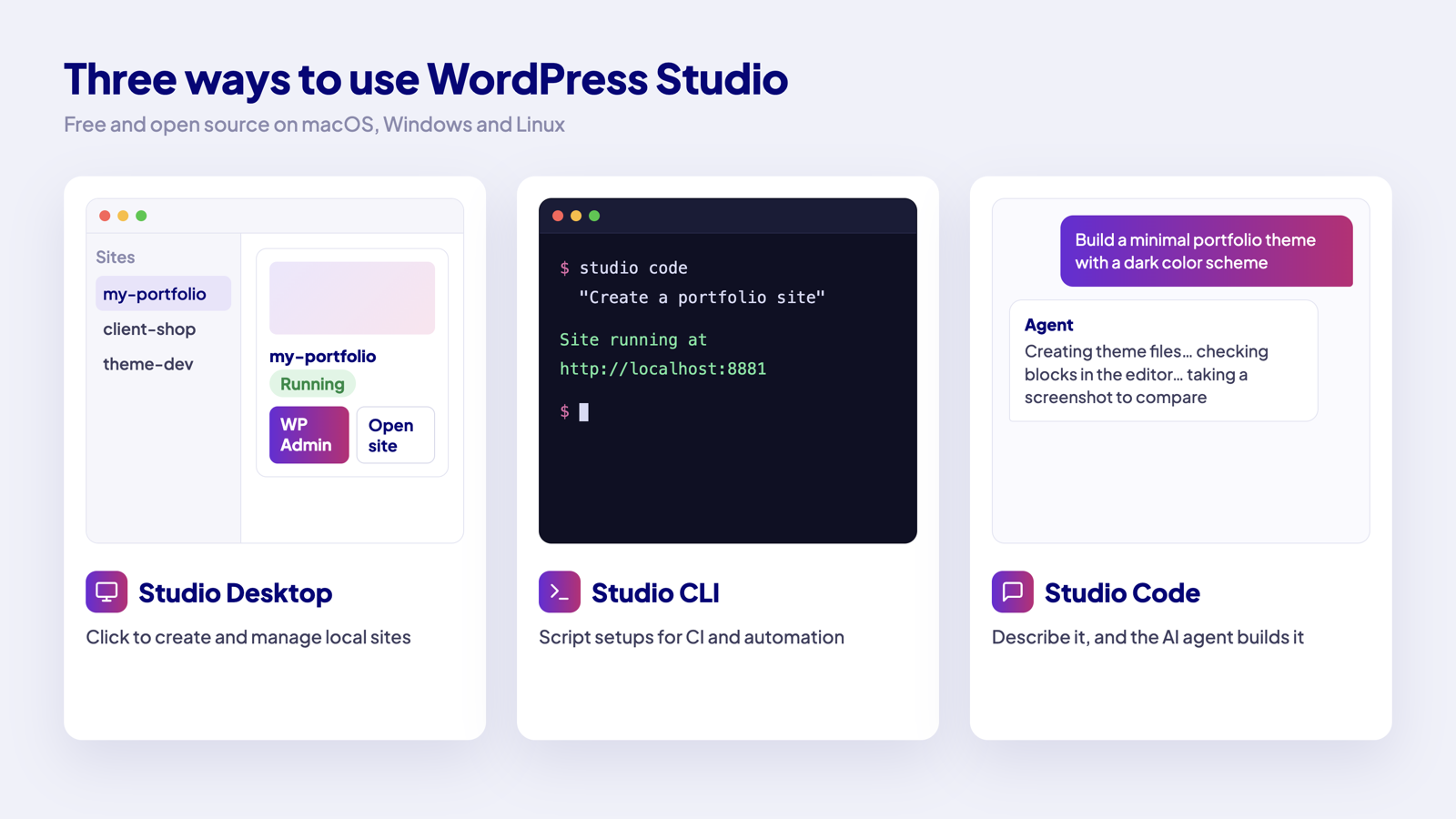
| Way | What it is | Best for |
|---|---|---|
| Studio Desktop | The point-and-click app for creating and managing local sites | Day-to-day site work |
| Studio CLI | The command-line version | Scripts, CI, automation and remote setups |
| Studio Code | An AI agent in the desktop app and the terminal | Building blocks, themes, plugins or whole sites from a prompt |
How to create your first site in WordPress Studio
- Download WordPress Studio from the WordPress Studio page and open it. You can skip the WordPress.com login with “Not now”.
- Click Add site (+) next to Sites, or press Cmd+N (Ctrl+N on Windows).
- Choose Create, then Blank site.
- Enter a site name and check the local path, WordPress version and PHP version. Advanced settings let you set a custom domain and the admin username, password and email.
- Click Create site. The site starts automatically and you can open WP Admin in one click.
Import an existing site
To work on a copy of a live site, choose Import instead of Create. Studio accepts .zip, .tar.gz, .tar, .wpress (All-in-One WP Migration) and WordPress .xml exports, including Jetpack backups and exports from Local and Playground. You can also export a full site as a .zip or the database as an .sql file.
Studio Code: the AI agent inside WordPress Studio
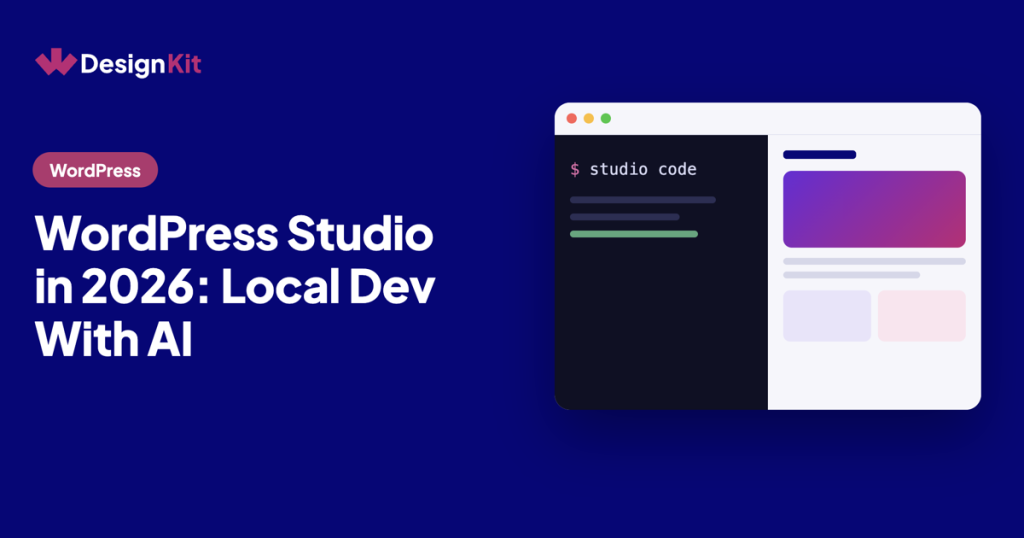
Studio Code is the biggest change this year. WordPress.com calls it “an agentic coding tool built into the WordPress Studio desktop app and WordPress Studio CLI”.
What Studio Code can do
- Build from a prompt, a reference URL or a folder of images.
- Validate every block it writes against the real block editor.
- Screenshot its own work and keep iterating until the layout matches the request.
- Take prompts in any language.
Example prompts from the documentation include “Build a minimal portfolio theme with a dark color scheme” and “Create a preview site so I can share this with my client”.
How to start Studio Code
- Desktop: select a site and type in the chat box.
- Terminal: run
studio code, ornpx wp-studio@latest codewithout a global install. Slash commands such as/model,/previewand/creditsmanage the session.
What it costs
By default Studio Code uses WordPress.com AI credits, which need a WordPress.com login and a payment method on file. Every account gets a one-time free allowance on the Fast tier; the Balanced and Strong tiers need purchased credits. You can use your own Anthropic API key instead.
Use your own AI agent with Studio over MCP
If you already work in Claude Code, Cursor, VS Code or Codex, Studio exposes an MCP server so those agents can create, start and stop your local sites, run WP-CLI commands and take screenshots. In Claude Code the setup is one command: claude mcp add wordpress-studio -- studio mcp. Our guide to WordPress MCP explains how MCP connections work and what to check before you give an agent access.
Blueprints, preview sites and sync
Blueprints
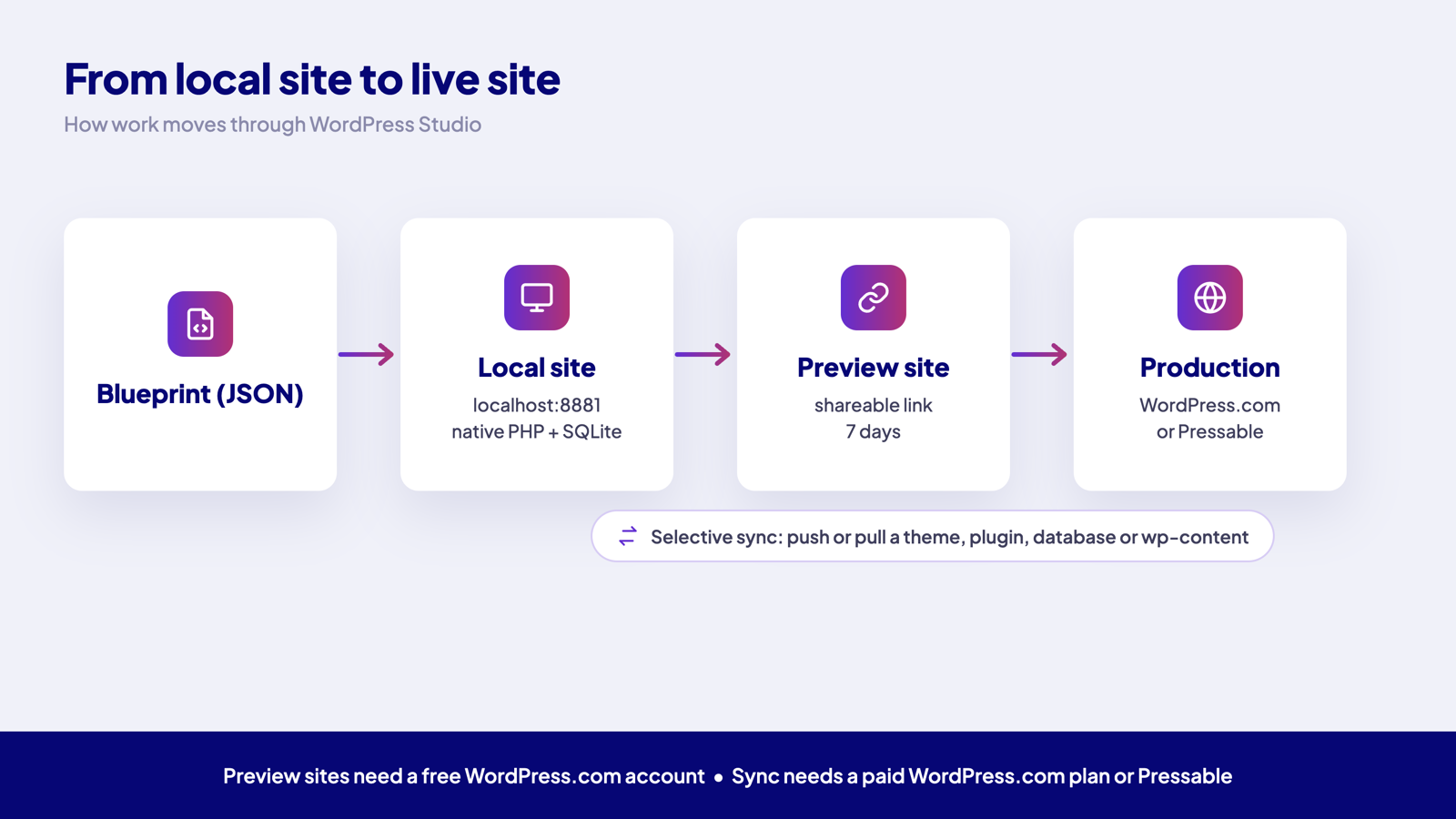
A Blueprint is a JSON file that describes how to build a site: WordPress and PHP versions, plugins and themes, site options, content and custom steps. Studio Blueprints use the same format as WordPress Playground Blueprints, so they work in both. Studio ships starter Blueprints for theme and plugin development, WordPress.com and WooCommerce.
Preview sites
A preview site is a hosted copy of a local site on a temporary domain, so a client can review it without tunnels. It needs a WordPress.com account, stays live for seven days after the last update, and you can have up to ten free preview sites at a time.
Selective sync
Sync pushes or pulls anything from a single theme or plugin to the database or the whole wp-content folder. It works with WordPress.com sites on paid plans and Pressable sites with Jetpack. User tables are not uploaded when you publish.
WordPress Studio vs Playground vs Local
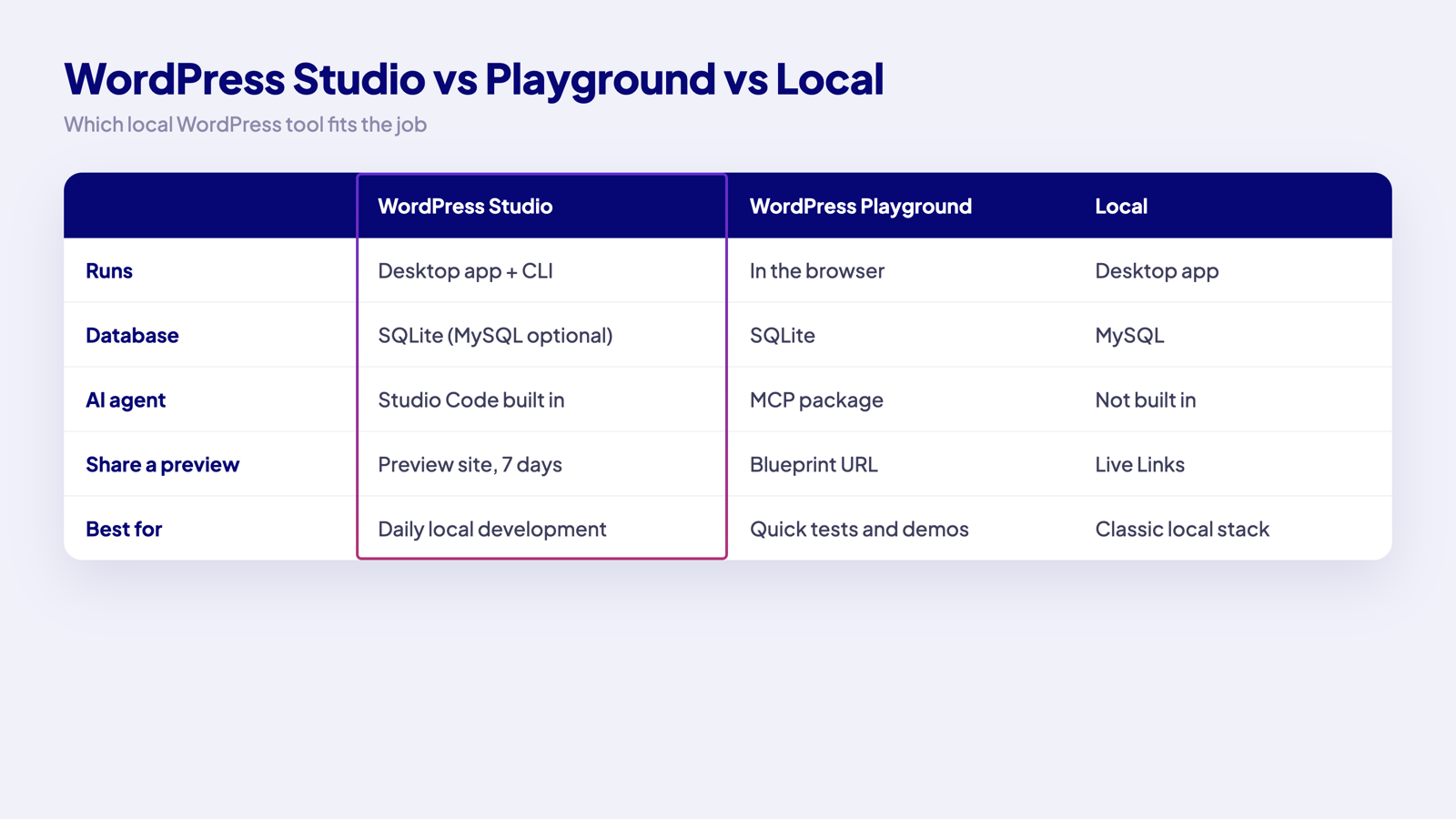
| WordPress Studio | WordPress Playground | Local | |
|---|---|---|---|
| Where it runs | Desktop app and CLI | In the browser | Desktop app |
| Database | SQLite (MySQL optional) | SQLite | MySQL |
| AI | Studio Code agent and MCP server | MCP package for AI agents | No built-in agent |
| Going live | Sync to WordPress.com or Pressable, or export | Export the site | Your usual migration tools |
| Best for | Ongoing local development | Quick tests, demos and throwaway sites | A classic local server stack |
Choose Playground when you need a disposable site in seconds; our WordPress Playground guide covers it. Choose Studio for real projects you will keep working on, especially on WordPress.com or Pressable hosting.
Known limits of local development with Studio
- SQLite is not MySQL. Most plugins work, but test database-heavy plugins carefully, or switch the site to MySQL. Use the built-in phpMyAdmin rather than editing the database file.
- Email is not sent. Studio saves outgoing emails as
.emlfiles in~/.studio/email/(the 100 most recent per site), which is useful for testing forms. - Preview sites expire. They last seven days after the last update; permanent public sites need a paid hosting plan.
- The file sandbox is not strict. The docs say the default file access “is not a strict sandbox”, so only run code you trust.
- Windows performance. Windows Defender real-time protection can slow site creation and PHP.
Why search interest keeps growing
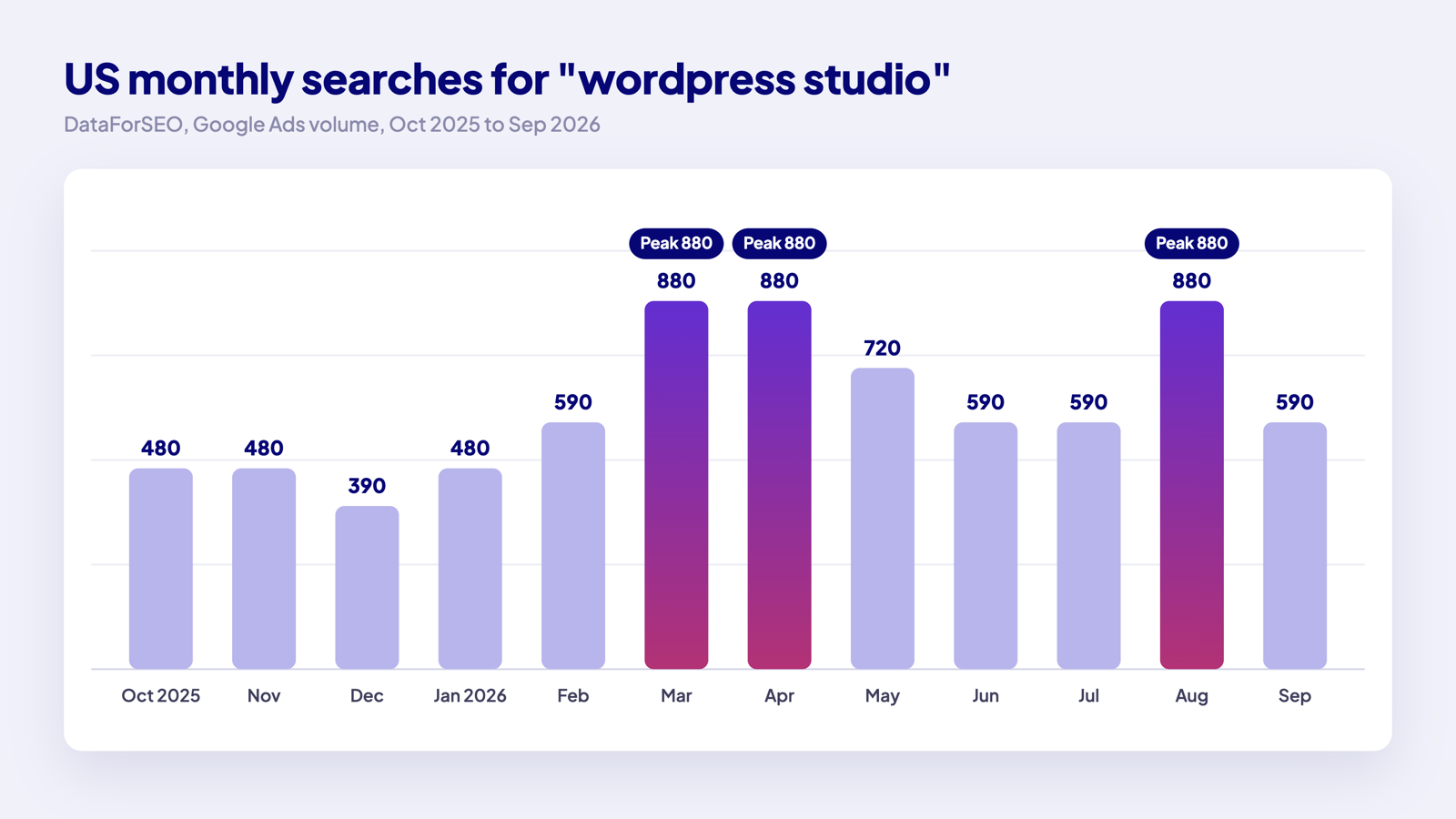
Demand peaked at 880 searches a month in March, April and August 2026 and has not dropped below 590 since February. Related searches on Google include “WordPress Studio download”, “WordPress Studio for Windows” and “WordPress Studio vs LocalWP”, which shows people comparing it with Local before switching.
Is WordPress Studio right for you?
- Use it if you build themes, plugins or client sites and want a fast local setup without Docker, or if you want to try AI site building away from a live site.
- It fits best if you host on WordPress.com or Pressable, since sync and preview sites are built for those hosts.
- On other hosts, build locally and move the site with your usual migration plugin or export.
Page builders work as normal on a Studio site, so it is also a safe place to test designs. For example, you can import a full Elementor template kit into a local site, try different fonts and colours, and only move it live when the client signs off. Share your local setup in the WDesignKit Facebook group.
Frequently Asked Questions
wordpress studio vs local: which one should I use for real projects?
WordPress Studio fits ongoing local development better when you want a fast setup without Docker and plan to keep working on the site. It runs full WordPress sites on your computer, uses SQLite by default, and adds Studio Code for AI-assisted building. Local is still the classic choice if you want a traditional local server stack with MySQL. WDesignKit Learning Center frames Studio as the better pick for WordPress.com or Pressable workflows because sync and preview sites are built around those hosts.
Why is WordPress Studio not starting my site properly on Windows?
Windows Defender real-time protection can slow site creation and PHP in WordPress Studio, so performance issues on Windows are often security-software related rather than a broken install. Studio also runs native PHP binaries, not Docker or Apache, so startup behavior is different from older local stacks. If a site feels sluggish, that Windows-specific slowdown is the first thing to suspect before blaming the project itself.
Can I use WordPress Studio with Elementor templates or page builders?
Page builders work normally on a Studio site, so it is a safe place to test designs before anything goes live. The page specifically calls out importing a full Elementor template kit into a local site, trying different fonts and colours, and only moving it live after client sign-off. That makes Studio useful when you want to experiment locally without risking changes on production.
What is the best way to move an existing live WordPress site into WordPress Studio?
Import is the right path when you want a copy of a live site instead of starting from scratch. Studio accepts .zip, .tar.gz, .tar, .wpress files from All-in-One WP Migration, and WordPress .xml exports, including Jetpack backups and exports from Local and Playground. That matters because it covers most common migration formats, so you can bring in an existing project without rebuilding it by hand.
How does WordPress Studio compare with WordPress Playground for testing sites?
WordPress Playground is better for disposable sites in seconds, while WordPress Studio is aimed at real projects you will keep working on. Playground runs in the browser and exports the site when you are done. Studio runs as a desktop app or CLI, supports preview sites and sync, and includes Studio Code plus MCP support. WDesignKit Learning Center positions Studio as the stronger choice when you need an ongoing local workflow rather than a throwaway demo.
Last reviewed: November 5, 2026
Author

Sagar is the Founder & CEO of POSIMYTH Innovations, with 10+ years building WordPress products trusted by 100,000+ websites globally. He has led the development of The Plus Addons for Elementor, Nexter, WDesignKit, and UiChemy, all built hands-on from concept to launch. His work focuses on making website building faster, more flexible, and accessible for creators and businesses worldwide.
Share this article